Headless WordPress has moved from a niche developer experiment to a mainstream architecture choice for teams that need both powerful content management and blazing-fast front-end performance. If you have heard the term thrown around but are still unsure what it actually means or whether it is right for your project, this guide breaks it down step by step, including the honest trade-offs most articles skip over.
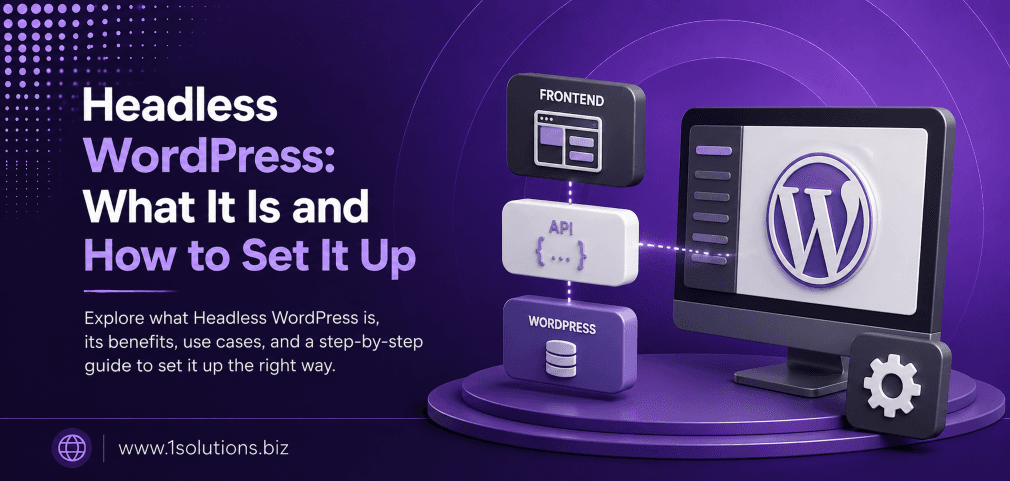
Headless WordPress decouples the CMS back end from the front-end presentation layer, letting developers use any framework (React, Next.js, Gatsby, etc.) to display content delivered via the WordPress REST API or WPGraphQL. The setup offers speed and flexibility gains but adds real complexity in hosting, SEO configuration, and plugin compatibility.
⚡ Key Takeaways
- Headless WordPress keeps WordPress as the content back end while a separate front-end framework handles rendering.
- Content is delivered through the WordPress REST API or WPGraphQL rather than traditional PHP templates.
- Performance gains are real but not automatic. A poorly configured headless setup can be slower than a traditional theme.
- SEO requires deliberate configuration at the front-end layer since standard WordPress SEO plugins do not auto-apply.
- The approach is best suited for developer teams, high-traffic sites, and multi-channel content delivery needs.
- Hosting costs and infrastructure complexity typically increase compared to a standard WordPress setup.
- Plugins that rely on PHP rendering (page builders, some form plugins) may not function as expected in a headless environment.
What Is Headless WordPress?
Traditional WordPress is a coupled system. The PHP back end manages both content storage and the HTML output that visitors see. Every page request hits the server, WordPress processes the PHP, and a fully rendered HTML page is returned to the browser. This works well, but it ties you to PHP templates and can create performance bottlenecks at scale.
Headless WordPress removes the “head,” which is the front-end presentation layer, and keeps only the body, which is the content management system. WordPress continues to handle everything editors care about: writing posts, managing media, setting up taxonomies, and using the familiar dashboard. The difference is that instead of WordPress rendering the HTML, it exposes content through an API, and a completely separate front-end application, built in React, Next.js, Nuxt, Gatsby, or any other modern framework, fetches that content and renders the actual pages visitors see.
According to a 2023 State of the Word report cited by WordPress.org, the REST API receives billions of requests per month, reflecting how widely developers are already using programmatic access to WordPress content even outside fully headless setups.
How Headless WordPress Differs from Traditional WordPress
Understanding the architectural split is essential before deciding whether to make the switch. The table below captures the core differences at a glance.
| Factor | Traditional WordPress | Headless WordPress |
|---|---|---|
| Front-end rendering | PHP templates (themes) | JavaScript framework (React, Next.js, etc.) |
| Content delivery | Server-rendered HTML | REST API or WPGraphQL |
| Plugin compatibility | Full support | Limited for PHP-rendered plugins |
| Developer skill needed | PHP, CSS, WordPress hooks | JavaScript, API integration, DevOps |
| SEO configuration | Mostly handled by plugins | Manual setup in front-end layer required |
| Hosting setup | Single server or managed host | Two environments (CMS + front end) |
| Performance ceiling | Good with caching | Excellent with static generation |
| Cost | Lower baseline | Higher (infrastructure + dev time) |
When Headless WordPress Makes Sense (and When It Does Not)
Headless architecture is not the right fit for every project. Here are the scenarios where it genuinely pays off and where it would only add unnecessary complexity.
Good Candidates for Headless WordPress
- High-traffic editorial sites that need sub-second load times and can benefit from static site generation.
- Multi-channel content delivery where the same content needs to appear on a website, a mobile app, a kiosk, and a smartwatch interface.
- Teams with dedicated JavaScript developers who are more comfortable in React or Vue than in PHP.
- E-commerce projects pairing WordPress content with a separate commerce engine. If you are weighing platform choices, our WooCommerce vs Shopify comparison guide covers how each platform fits into modern architectures.
- Projects requiring strict front-end performance budgets, such as media companies or SaaS product marketing sites.
Poor Candidates for Headless WordPress
- Small business sites managed by non-technical owners who rely on drag-and-drop page builders.
- Projects with tight budgets where the added hosting and development overhead is not justified.
- Sites heavily dependent on WooCommerce with complex checkout flows that rely on PHP hooks.
- Teams without JavaScript expertise who would spend more time troubleshooting than benefiting.
💡 Pro Tip: Before committing to headless, audit your current plugin list. If more than a third of your active plugins rely on front-end PHP rendering, switching to headless will require either replacing those plugins or rebuilding their functionality from scratch in your JavaScript framework.
The Technology Stack: What You Need
A headless WordPress setup involves several moving parts. Getting familiar with each layer before you start will save you significant troubleshooting time later.
The Back End: WordPress as a Headless CMS
WordPress itself requires no special configuration to become a headless CMS. The REST API is built in and available at /wp-json/wp/v2/ on any WordPress installation. However, most serious headless projects install WPGraphQL, a free open-source plugin that exposes WordPress data through a GraphQL endpoint, giving front-end developers more efficient, typed queries compared to the REST API.
The Front End: JavaScript Frameworks
The most widely used choices in 2024 include Next.js (React-based, with strong static generation and server-side rendering support), Gatsby (React-based, optimized for static sites), Nuxt (Vue-based), and Astro (framework-agnostic, excellent for content sites). Next.js has become the dominant option for headless WordPress projects due to its flexibility and strong ecosystem.
Supporting Tools
- WPGraphQL: GraphQL API layer for WordPress.
- Faust.js: A JavaScript framework built specifically for headless WordPress by WP Engine.
- Advanced Custom Fields (ACF): Extends the data you can expose through the API. ACF data is queryable via WPGraphQL with the WPGraphQL for ACF extension.
- Yoast SEO or Rank Math: Both have WPGraphQL compatibility plugins that expose SEO meta data to your front end.
Step-by-Step: How to Set Up Headless WordPress
The following steps assume you have a WordPress installation already running and that you are setting up a Next.js front end as the presentation layer. The concepts translate to other frameworks with minor adjustments.
Step 1: Prepare Your WordPress Back End
- Log in to your WordPress dashboard and navigate to Plugins, then Add New.
- Search for WPGraphQL and install and activate the plugin by Jason Bahl.
- Once activated, go to GraphQL in your dashboard menu and click on Settings. Enable public introspection so your front-end queries can discover the schema during development.
- If you use Advanced Custom Fields, install the WPGraphQL for ACF plugin to expose custom field data to your GraphQL queries.
- For SEO meta data, install either Yoast SEO plus the Add WPGraphQL SEO plugin, or Rank Math with its built-in WPGraphQL support.
- Visit GraphQL and then the GraphiQL IDE to confirm your endpoint is working. Run a simple query like
{ posts { nodes { title } } }and verify you get a response.
Step 2: Set Up Your Next.js Front End
- Open your terminal and run
npx create-next-app@latest my-headless-siteto scaffold a new Next.js project. - Change into the project directory with
cd my-headless-site. - Install a GraphQL client. Apollo Client is the most common choice:
npm install @apollo/client graphql. - Create an
.env.localfile in the project root and add your WordPress GraphQL endpoint:NEXT_PUBLIC_WORDPRESS_API_URL=https://your-wordpress-site.com/graphql. - In your project, create a
lib/apollo.jsfile to initialize the Apollo Client pointing to that environment variable.
Step 3: Query WordPress Content in Next.js
- Create a page file such as
pages/blog/index.js. - Write a GraphQL query to fetch your posts. A basic example retrieves post titles, slugs, excerpts, and featured images.
- Use Next.js
getStaticPropsfor statically generated pages orgetServerSidePropsfor server-rendered pages. Static generation is recommended for blog archives and individual posts since it gives you pre-built HTML files served from a CDN. - Map the returned data to your React components and render the content.
- For dynamic routes (individual post pages), use
getStaticPathsto tell Next.js which slugs to pre-build at build time.
Step 4: Handle SEO in the Front-End Layer
This step is critical and often underestimated. Because WordPress SEO plugins like Yoast write meta tags into PHP-rendered HTML, those tags do not automatically appear in your Next.js output. You must explicitly query the SEO data from WPGraphQL and inject it into your page <head>.
- Install the
next/headcomponent (built into Next.js) or the popularnext-seopackage. - Add the Yoast or Rank Math WPGraphQL fields to your content queries so each page fetches its own title, meta description, canonical URL, and Open Graph data.
- Pass those values into your SEO component for each page.
- Verify your meta tags are rendering correctly by inspecting the page source in your browser or using a tool like Screaming Frog.
Getting SEO right in a headless environment is non-trivial. If your team needs support with the broader SEO strategy behind a site rebuild, our professional SEO services can audit your technical setup and ensure nothing critical falls through the cracks during the migration.
Step 5: Configure On-Demand Revalidation (ISR)
- Next.js Incremental Static Regeneration (ISR) allows you to update static pages without a full rebuild. Set a
revalidatevalue ingetStaticPropsto control how often Next.js checks for fresh content. - For time-sensitive content, configure on-demand revalidation using WordPress hooks. When a post is published or updated, WordPress can trigger a webhook that calls your Next.js revalidation endpoint, updating only the affected pages immediately.
- Install a plugin like WP Webhooks on the WordPress side to send POST requests to your Next.js revalidation API route whenever content changes.
💡 Pro Tip: Set different revalidation intervals based on content type. Homepage and category pages may need updates within minutes of a new post, while older evergreen articles can have revalidation intervals measured in hours or even days. This reduces unnecessary API calls and keeps build costs low.
Step 6: Deploy Both Environments
- Host your WordPress back end on a managed WordPress host. Options like WP Engine, Kinsta, or Cloudways are popular because they handle PHP performance and security patches, freeing your team to focus on the front end.
- Deploy your Next.js front end on Vercel (the company behind Next.js), Netlify, or a cloud provider like AWS Amplify. Vercel has the tightest integration with Next.js features including ISR.
- Lock down your WordPress installation. Since visitors never interact with the WordPress front end directly, you can block public access to it or restrict it by IP, reducing your attack surface significantly.
- Set up environment variables in your deployment platform for the WordPress API URL and any authentication tokens.
SEO Considerations for Headless WordPress
One of the most frequently asked questions about headless WordPress is whether it hurts SEO. The honest answer: it can, if handled carelessly, and it can improve SEO significantly if done well.
According to Ahrefs (2023), page speed is consistently among the top factors correlated with higher search rankings, and headless architectures with static generation can dramatically improve Core Web Vitals scores. However, the same research notes that crawlability issues caused by client-side rendering without proper server-side fallbacks are a common cause of indexing failures.
If you are worried about content visibility, our post on why Google is not indexing your pages covers the specific technical causes that apply directly to JavaScript-heavy architectures. Additionally, understanding how Google processes modern web content is becoming increasingly important as the search landscape evolves. Our breakdown of Google AI Mode vs AI Overviews explains how structured, crawlable content remains foundational regardless of how search interfaces change.
Key SEO practices for headless WordPress include: always serving fully rendered HTML (use static generation or server-side rendering, never rely solely on client-side rendering), generating and submitting an XML sitemap from the front-end framework, configuring canonical URLs in your JavaScript SEO component, and implementing structured data (Schema markup) directly in your Next.js components.
Performance and Real-World Results
The performance case for headless WordPress is compelling but context-dependent. A 2022 study by Vercel found that Next.js sites with static generation scored an average Largest Contentful Paint (LCP) of under 1.2 seconds compared to a median of 2.5 seconds for traditional server-rendered PHP sites under similar conditions. However, poorly implemented hydration in React components can negate these gains entirely.
Content-heavy sites that benefit most are those with large archives, high concurrent traffic, and globally distributed audiences where CDN delivery of pre-built HTML files reduces latency across the board. Smaller sites with fewer than a few thousand monthly visitors are unlikely to see meaningful user experience differences that justify the additional complexity.
For teams evaluating whether a full headless rebuild is the right investment or whether strategic performance optimization of an existing WordPress setup would achieve similar results, working with an experienced WordPress development team can help you make an objective assessment before committing resources.
Common Mistakes to Avoid
- Skipping server-side rendering for dynamic pages: Any page that needs to reflect real-time data (user accounts, live inventory, personalized content) must use SSR or ISR, not pure static generation.
- Ignoring authentication for preview mode: Content editors need to preview unpublished posts. Next.js Draft Mode (formerly Preview Mode) requires a secure token-based setup to pull draft content from WordPress without exposing it publicly.
- Overlooking image optimization: WordPress media URLs served directly in a headless setup bypass Next.js Image optimization. Configure your Next.js image domains or use a CDN with image transformation to keep assets optimized.
- Not planning for form handling: Contact forms, newsletter signups, and search functionality all need to be rebuilt or replaced in the front-end layer. Tools like Gravity Forms have REST API support, but the implementation is not as simple as dropping a shortcode.
- Neglecting content editor experience: Your editorial team still works in WordPress. Make sure their workflow is not degraded. Live preview, intuitive custom fields, and clear publishing status are worth prioritizing.
💡 Pro Tip: Use Faust.js if your team wants a structured starting point purpose-built for headless WordPress. It handles authentication, preview mode, and routing patterns that you would otherwise spend weeks configuring manually in a generic Next.js setup. It also has strong community support and documentation maintained by WP Engine.
Practical Action Plan
Use these priority tiers to structure your headless WordPress implementation based on what will have the biggest impact first.
- Do This Now: Install WPGraphQL and verify your content is accessible through the GraphQL IDE. This single step confirms your WordPress back end is ready for headless consumption without any front-end work yet. Also audit your current plugin list for PHP-rendered front-end dependencies before writing a single line of front-end code.
- Worth Doing: Set up a Next.js prototype that fetches and displays a single post type from your WordPress API. This proof of concept reveals integration friction early, especially around SEO meta data, image handling, and authentication, before you have committed to a full rebuild.
- Low Priority: Explore advanced patterns like multi-site WordPress setups serving multiple front-end properties, or integrating third-party APIs (e-commerce, CRM) directly into your GraphQL layer. These are powerful but only relevant once your core headless pipeline is stable and your team is comfortable with the fundamentals.
If you want to go deeper on SEO strategy for a site under development or post-launch, our post on boosting SEO through page content analysis offers a practical methodology that applies equally to headless and traditional architectures. For teams also working on content production to populate a new headless site, understanding what makes content perform is as important as the technical setup.
It is also worth keeping an eye on how AI-driven search is changing content discoverability. Our guide on improving website visibility in AI search engines covers what structured, well-organized content needs to look like to perform well as search interfaces continue to evolve.
Conclusion
Headless WordPress is a powerful architectural choice with genuine advantages in performance, flexibility, and multi-channel content delivery. However, it is not a silver bullet. The trade-offs in plugin compatibility, SEO configuration effort, infrastructure cost, and developer skill requirements are real and should be weighed honestly against your project’s actual needs.
For teams with the right technical resources and a clear use case, a well-implemented headless WordPress setup can outperform traditional WordPress in measurable ways. For everyone else, a well-optimized traditional WordPress site with good caching and a performant theme will likely deliver comparable results with far less complexity.
Start small. Install WPGraphQL, build a prototype, and validate the approach before committing to a full migration. The best headless WordPress projects are the ones that treated the architecture as a deliberate choice, not a trend to follow.
Frequently Asked Questions About Headless WordPress
Does headless WordPress hurt SEO?
Not inherently. If your front-end framework uses static generation or server-side rendering, Googlebot receives fully rendered HTML just as it would from a traditional WordPress site. Problems arise when content is rendered entirely client-side in JavaScript without a server-rendered fallback, which can delay indexing. Proper meta tag injection, canonical URL configuration, and sitemap generation are all required at the front-end layer rather than being handled automatically by WordPress plugins.
Can I use WooCommerce in a headless WordPress setup?
Yes, but with significant caveats. WooCommerce has REST API endpoints and WPGraphQL support through the WooGraphQL extension. However, complex checkout flows, payment gateway integrations, and cart management that rely on PHP sessions require careful rebuilding in the front-end layer. Many teams pair headless WordPress content with a dedicated commerce front end rather than trying to fully headless WooCommerce. Our WooCommerce vs Shopify comparison explores how each platform handles modern architecture needs.
What is the difference between headless WordPress and a static WordPress site?
A static WordPress site (generated by plugins like Simply Static) exports your existing WordPress theme’s output as flat HTML files. Headless WordPress uses a completely separate front-end framework that queries WordPress content dynamically through an API and renders pages using JavaScript. The static site approach is simpler but less flexible. Headless gives you full control over the front-end technology stack at the cost of greater setup complexity.
Is Faust.js better than building a custom Next.js setup from scratch?
For most teams adopting headless WordPress for the first time, Faust.js provides a meaningful head start. It handles authentication, preview mode, and WordPress-specific routing patterns that take significant effort to configure manually. A fully custom Next.js setup gives you more control and avoids any Faust.js-specific constraints, but it requires deeper experience. Start with Faust.js and migrate to a custom setup only if you hit limitations.
How much does a headless WordPress setup cost compared to traditional WordPress?
Costs vary widely based on team size and project scope, but expect at minimum two hosting environments: one for WordPress (back end) and one for your front-end application. Managed WordPress hosting typically runs from a modest monthly fee upward, and front-end hosting on platforms like Vercel has free tiers for smaller projects with costs scaling based on build minutes and bandwidth. The larger cost is usually developer time. A headless implementation requires JavaScript expertise that commands higher rates than traditional WordPress PHP development, and the initial setup typically takes significantly longer than building a conventional WordPress theme.