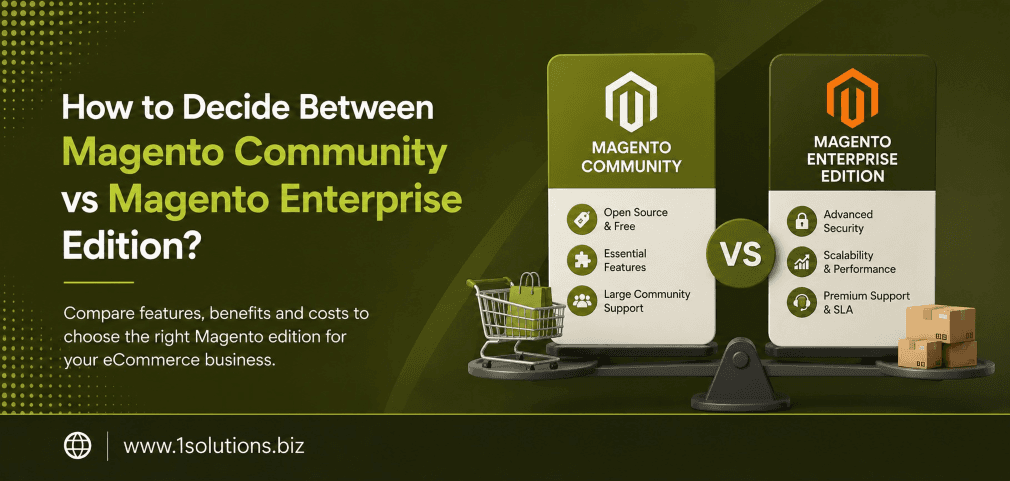
How to Decide Between Magento Community vs Magento Enterprise Edition
Choosing the right ecommerce platform can shape the trajectory of your entire online business. When you’re asking how to decide between Magento Community vs Magento Enterprise Edition, you’re really asking a deeper question: what does your business actually need right now, and where is it heading? Both editions are built on the same core architecture, but the gap between them in terms of features, cost, and support is significant enough to make the wrong choice costly.
This comparison breaks down both editions honestly, including the trade-offs most vendors won’t tell you upfront.
Magento Open Source (Community) is free, flexible, and developer-friendly but requires more hands-on management. Magento Commerce (Enterprise) offers advanced built-in features, dedicated support, and better scalability but comes at a steep price. The right choice depends on your budget, technical resources, and growth ambitions.
⚡ Key Takeaways
- Magento Open Source is free to download but has real costs in hosting, development, and extensions.
- Magento Commerce (Enterprise) licensing typically starts at around $22,000 per year for mid-size merchants.
- Enterprise includes advanced features like B2B functionality, customer segmentation, and a built-in page builder that Community lacks natively.
- Community is often the right fit for small to mid-size stores with strong developer support.
- Enterprise makes sense when you’re processing high order volumes, need SLA-backed support, or operate B2B and B2C simultaneously.
- Total cost of ownership, not just licensing, should drive your decision.
- Your SEO and marketing infrastructure should be a factor in platform selection, not an afterthought.
Understanding the Two Editions: A Quick Overview
Magento has two primary flavors. Magento Open Source, formerly called Magento Community Edition, is the free, open-source version that anyone can download and build on. Magento Commerce, formerly called Magento Enterprise Edition, is the paid commercial version that Adobe now owns and markets as part of its Commerce Cloud ecosystem.
Both share the same PHP-based codebase and support a wide ecosystem of themes, extensions, and integrations. But the similarities start to thin out once you look at what each edition includes by default.
According to BuiltWith data from 2024, Magento powers over 250,000 live websites globally, making it one of the most deployed ecommerce platforms for mid-to-large merchants. That reach spans both editions, which is part of why comparing them head-to-head matters so much for anyone investing in the platform.
Feature Comparison: What You Actually Get
| Feature | Magento Open Source (Community) | Magento Commerce (Enterprise) |
|---|---|---|
| Licensing Cost | Free | Starts ~$22,000/year |
| Page Builder | Not included natively | Included |
| Customer Segmentation | Not included | Included |
| B2B Functionality | Requires extensions | Built-in B2B module |
| Advanced Reporting | Basic reports only | Business Intelligence included |
| Staging and Preview | Not available | Content staging included |
| Reward Points and Store Credit | Extension required | Native support |
| Adobe Support SLA | Community forums only | Dedicated support team |
| Elasticsearch | Available | Available with more configuration options |
| Multi-store Management | Available | Available with enhanced tools |
Magento Open Source: Pros and Cons
Pros of Magento Community Edition
Zero licensing cost. The software itself is free to download and use. For a lean startup or a developer building a proof of concept, this removes the biggest financial barrier to entry.
Full code access and flexibility. Because it’s open source, your development team can modify anything. This level of control is something platforms like Shopify simply can’t offer. If you’re comparing alternatives, our breakdown of WooCommerce vs Shopify shows how open-source flexibility compares across different platforms.
Large developer community. Thousands of developers worldwide work with Magento Open Source. Finding skilled help, extensions, and documentation is relatively straightforward compared to proprietary platforms.
Extensive extension marketplace. The Magento Marketplace has thousands of free and paid extensions that can replicate many Enterprise features, sometimes at a fraction of the cost.
Good baseline SEO architecture. Magento Open Source includes canonical URLs, customizable meta fields, sitemap generation, and layered navigation with SEO-friendly URLs. Pair this with a solid ecommerce SEO strategy and you have a strong foundation.
Cons of Magento Community Edition
Hidden costs add up quickly. While the software is free, hosting, development, security patches, and premium extensions can push total annual costs well above $15,000 for a properly maintained store. Research by Nexcess in 2023 estimated that a production-ready Magento Open Source store costs between $15,000 and $55,000 per year when all operational expenses are included.
No official Adobe support. If something breaks, you’re relying on forums, Stack Exchange, or your own development team. For revenue-generating stores, this is a significant operational risk.
Missing enterprise-grade features natively. Features like content staging, advanced customer segmentation, and B2B quoting require paid extensions or custom development, which narrows the cost gap with Commerce.
Security responsibility falls on you. You are responsible for applying patches, monitoring vulnerabilities, and maintaining PCI compliance. This demands either internal expertise or a reliable agency partner.
💡 Pro Tip: If you’re running Magento Open Source and want to compete with Enterprise-level marketing capabilities, invest in a strong ecommerce marketing strategy to compensate for the platform’s native feature gaps. Smart marketing often outperforms expensive software features.
Magento Commerce (Enterprise): Pros and Cons
Pros of Magento Enterprise Edition
Advanced native features. Content staging and preview, customer segmentation, reward points, gift registry, store credit, and a drag-and-drop page builder are all included out of the box. You don’t need third-party extensions for these, which reduces complexity and potential compatibility issues.
Built-in B2B module. If you’re selling to other businesses, the B2B module handles company accounts, custom catalogs, negotiated quotes, requisition lists, and payment on account natively. Building this with extensions on Community edition would cost tens of thousands of dollars.
Adobe Business Intelligence (BI). Enterprise includes a data visualization and reporting suite that gives merchants real insights into customer lifetime value, cohort analysis, and product performance without needing a separate analytics platform.
Official Adobe support. Paying customers get SLA-backed support directly from Adobe’s team. For stores generating significant daily revenue, this is not a luxury. It’s a business continuity requirement.
Better performance at scale. Enterprise is engineered and tested for high concurrency and large catalog sizes. Adobe Commerce Cloud configurations also support Fastly CDN and Elasticsearch out of the box, which matters when traffic spikes during sales events.
Cons of Magento Enterprise Edition
Significant cost. According to Adobe’s published pricing structure in 2023, Magento Commerce licensing starts at approximately $22,000 per year for smaller revenue tiers and can exceed $125,000 per year for large-volume merchants. This is before hosting, development, or customization costs.
Overkill for smaller operations. If your store processes fewer than 500 orders per month and doesn’t operate B2B, many Enterprise features will go unused. Paying for capabilities you don’t need is poor resource allocation.
Still requires developer expertise. Despite its enterprise positioning, Magento Commerce is not a simple drag-and-drop platform. You still need experienced Magento developers to configure, customize, and maintain it properly.
Vendor dependency. Moving from Enterprise to Community or another platform later is difficult. The proprietary features you’ve built workflows around don’t transfer easily.
💡 Pro Tip: Before committing to Enterprise licensing, audit which features you’ll actually use within the first 12 months. Many merchants pay for capabilities they don’t activate for years. Build your feature roadmap first, then validate whether those features exist natively in Community with extensions or require Enterprise.
Total Cost of Ownership: The Real Comparison
The licensing fee is only one part of what you’ll spend. Understanding total cost of ownership (TCO) is essential when figuring out how to decide between Magento Community vs Magento Enterprise Edition.
A 2024 study by Gartner on ecommerce platform TCO found that companies frequently underestimate ongoing platform costs by 40 to 60 percent when they focus only on licensing or subscription fees. This applies directly to both Magento editions.
For Magento Open Source, your real costs include: managed cloud hosting (typically $500 to $3,000 per month depending on traffic), developer retainer fees, premium extensions (often $200 to $2,000 each), security monitoring, and regular performance optimization. When you add a robust ecommerce SEO program to drive traffic, the budget requirements for a competitive Community store are closer to Enterprise costs than most merchants expect.
For Magento Commerce, your real costs include: the annual license, hosting (Magento Cloud or third-party), customization development, and ongoing maintenance. However, many of the extensions you’d pay for on Community are already included, which genuinely offsets some of the licensing cost.
Which Businesses Should Choose Magento Community?
Magento Open Source is a strong choice when:
- You’re launching a new store and need to minimize upfront investment
- You have an in-house or contracted developer team with Magento experience
- Your catalog is straightforward with no B2B requirements
- Your monthly order volume is under 1,000 orders
- You’re comfortable managing your own hosting and security patching
- You want the flexibility to extend the platform without vendor constraints
This is also a practical stepping stone. Starting on Community doesn’t lock you out of Enterprise forever. Many successful merchants migrate to Commerce once their revenue justifies the cost.
Which Businesses Should Choose Magento Enterprise?
Magento Commerce makes financial sense when:
- Your annual online revenue exceeds $1 million, making the license fee a smaller percentage of revenue
- You operate B2B and B2C simultaneously
- You need content staging for complex promotional calendars
- Downtime or slow support resolution has a high revenue cost
- You’re processing thousands of orders per day and need proven scalability
- Your marketing team needs advanced segmentation and personalization tools
It’s also worth noting that if you’re heavily investing in paid acquisition, like Google Shopping campaigns, the advanced customer segmentation in Enterprise helps you create better-targeted experiences that improve your return on ad spend. Our guides on increasing sales with Google Shopping ads and optimizing your Google Shopping campaigns are useful complements to either platform.
💡 Warning: Don’t let agency partners push you toward Enterprise if your business doesn’t need it. Some implementation partners earn higher commissions on Enterprise projects. Always run the numbers independently and base the decision on your actual feature requirements and revenue scale.
SEO Considerations for Both Editions
Both editions of Magento are built with SEO in mind, but there are meaningful differences in how easily you can execute an advanced SEO strategy on each.
Magento Open Source gives you full control over your URL structure, meta data, canonical tags, and XML sitemaps. However, without content staging, rolling out SEO-optimized landing pages, category refreshes, or seasonal content requires manual work or workarounds. This can slow down your content velocity.
Magento Commerce’s content staging capability allows your marketing team to schedule SEO content updates in advance, preview them before going live, and coordinate content changes with promotional campaigns. For stores producing a high volume of content-driven traffic, this feature alone has measurable SEO value.
Regardless of which edition you choose, SEO performance depends heavily on what happens above the platform layer: your content quality, site speed, structured data, and backlink profile. Resources like boosting SEO with page content analysis and understanding why Google isn’t indexing your pages apply equally to both Magento editions.
Also worth considering: as AI-driven search changes how buyers discover products, your platform’s ability to support structured data and content depth becomes more important. See how improving visibility in AI search engines applies to ecommerce content strategies.
Migration: Moving Between Editions
If you start on Community and later decide to upgrade to Enterprise, the migration is technically possible but not trivial. Because Enterprise uses the same core codebase, much of your existing store can be carried over. However, Enterprise-specific configurations, data structures for B2B features, and the content staging system require careful migration planning.
Going the other direction, from Enterprise to Community, is more disruptive. Any workflows built around native Enterprise features (customer segmentation rules, staged content, BI dashboards) will break or require replacement through custom development or third-party tools.
Migration is one area where working with an experienced ecommerce development partner pays dividends. The technical complexity alone can cost more than a year of Enterprise licensing if managed poorly.
Practical Action Plan: What to Do Next
Use this priority framework to move from decision to execution:
- Do This Now: Audit your current or projected business requirements. List which Enterprise-exclusive features you would genuinely use within 12 months (B2B quoting, content staging, BI reporting, customer segmentation). If you can only check one or two boxes, Community with targeted extensions is likely the right starting point.
- Worth Doing: Get real TCO estimates for both editions. Ask two or three Magento development agencies for ballpark budgets based on your specific store requirements. Compare the five-year cost of each path, not just year one. Include development, hosting, extensions, support, and SEO services.
- Low Priority: Evaluate the long-term vendor roadmap. Adobe has been evolving Magento Commerce into its broader Experience Cloud, which has implications for where the platform goes in five to ten years. This matters for strategic planning but should not be the deciding factor for your immediate platform choice. Focus on present-day business requirements first.
Frequently Asked Questions
Is Magento Open Source really free?
The software license is free, but the total cost of running a production Magento Open Source store includes hosting, developer time, premium extensions, and security maintenance. According to Nexcess (2023), total annual operating costs typically range from $15,000 to $55,000 depending on store complexity and traffic volume.
What is the main reason to choose Enterprise over Community?
The strongest reasons are: you need native B2B functionality, you require content staging for complex promotional calendars, you need SLA-backed support from Adobe, or you’re at a revenue scale where the license fee represents a small percentage of what downtime or missed features would cost you.
Can Magento Community Edition handle high traffic?
Yes, with proper hosting infrastructure. Magento Open Source can handle significant traffic if deployed on appropriately scaled cloud infrastructure with full-page caching, Elasticsearch, and a CDN. The difference is that Community doesn’t come with these configurations pre-optimized the way Adobe Commerce Cloud does for Enterprise customers.
How does Magento compare to WooCommerce or Shopify for ecommerce SEO?
Magento (both editions) offers more granular SEO control than Shopify and comparable depth to WooCommerce. However, SEO success on any platform depends more on your content strategy, technical execution, and link-building than on the platform itself. Check out our comparison of WooCommerce vs Shopify if you’re still exploring platform options. Our ecommerce SEO packages are designed to work across all major platforms.
Should I hire a Magento agency to help with this decision?
For complex stores or significant budgets, yes. An experienced Magento agency can provide realistic TCO estimates, identify which extensions replicate Enterprise features on Community, and help you avoid over-investing in capabilities you won’t use. Look for agencies that have deployed both editions and can give you honest trade-off analysis, not just pitch the higher-value project.
Conclusion
When you’re working through how to decide between Magento Community vs Magento Enterprise Edition, the answer almost always comes down to three things: your budget, your technical resources, and your feature requirements over the next two to three years. Neither edition is inherently superior. Community is not a “lesser” platform and Enterprise is not always worth its premium.
Start by listing your must-have features, build a realistic five-year TCO comparison for both paths, and resist the pressure to buy more platform than your business genuinely needs. Then invest the resources you save into what actually drives revenue: great products, compelling content, and a strong ecommerce marketing program that brings qualified buyers to your store regardless of which edition powers it.
The platform is the foundation. What you build on top of it, and how well you market it, determines whether that foundation pays off.