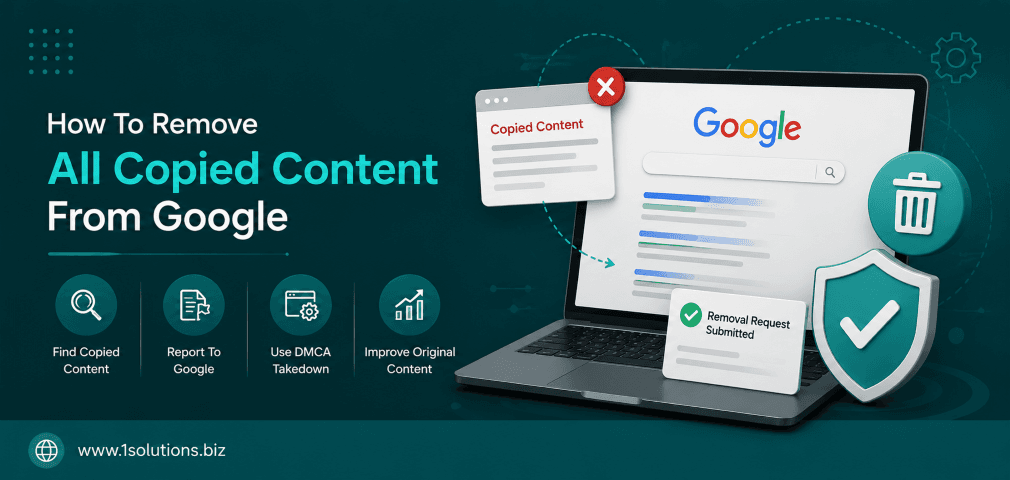
If someone has stolen your content and published it elsewhere, or if duplicate pages from your own site are competing against each other in search results, you need to act fast. The ability to remove all copied content from Google is not just about fairness — it directly protects your search rankings, domain authority, and the credibility your brand has worked hard to build. According to Semrush (2023), over 29% of web pages contain some form of duplicate content, making this one of the most widespread and underestimated SEO problems online.
Copied or duplicate content can seriously damage your Google rankings and brand authority. This guide walks you through 10 clear, actionable steps to identify, report, and remove all copied content from Google — whether the duplication is on your own site or caused by scraper websites stealing your work. Use these steps in order for the best results.
⚡ Key Takeaways
- Duplicate content — both self-caused and third-party scraping — can suppress your search rankings significantly.
- Google’s URL Removal Tool handles your own pages; DMCA takedowns handle content stolen by others.
- Canonical tags are your first line of defense against self-inflicted duplicate content issues.
- A well-documented DMCA complaint forces Google to delist infringing URLs within days in most cases.
- Monitoring tools like Copyscape and Google Search Console should be part of your ongoing content protection routine.
- If penalties have already hit your site, professional Google penalty recovery support can accelerate your comeback.
- Prevention through structured content policies is far cheaper than recovery after content theft has occurred.
Why Copied Content Hurts Your Google Rankings
Before diving into the removal steps, it helps to understand what Google actually does when it finds duplicate content. Google does not penalize duplicate content as a direct ranking factor in most cases, but it does filter duplicate pages and consolidates ranking signals — which means your original content may lose visibility to a scraped version if the scraper’s site has more authority. According to Moz (2022), pages with substantial duplicate content are 30% less likely to appear in top-10 search results compared to fully unique pages. Meanwhile, a study by Ahrefs (2023) found that 5.7% of scraped content pages outrank the original source in Google search results within 30 days of being published. That is a serious threat worth addressing immediately.
Understanding how to boost your SEO through page content analysis is a strong starting point because it helps you identify where duplication exists before it damages your rankings further.
10 Steps To Remove All Copied Content From Google
1. Audit Your Site for Duplicate Content First
The very first step is to conduct a thorough duplicate content audit on your own website. You cannot effectively remove all copied content from Google if you do not know exactly where the duplication exists. Use tools like Screaming Frog, Sitebulb, or Google Search Console to crawl your site and identify pages with identical or near-identical content. Pay special attention to URL variations caused by session IDs, tracking parameters, print-friendly versions, and HTTP versus HTTPS versions of the same page. These technical duplicates are often invisible to site owners but very visible to Google’s crawlers.
Export a full list of flagged URLs and categorize them: are they exact copies, near-duplicates, or just pages sharing introductory boilerplate text? The distinction matters because each type requires a slightly different fix. Self-generated duplicate content accounts for a large share of all duplicate content cases, and resolving it internally is faster and cheaper than fighting external scrapers. Once you have a clear picture of the internal duplication landscape, you can move on to checking whether your content has also been copied externally. Skipping this internal audit step is one of the most common mistakes site owners make when trying to remove copied content from Google. Do not skip it.
2. Use Copyscape and Google Search to Find Stolen Content
After cleaning house internally, your next task is to find out if anyone outside your site has copied your content without permission. Copyscape is the industry-standard tool for this. Enter your page URLs one at a time or use the Copyscape Premium batch search to scan multiple pages simultaneously. Copyscape will return a list of URLs that contain matching text from your pages, along with a percentage similarity score. Any match above 70% similarity deserves investigation.
You can also use Google Search itself by copying a unique sentence from your content, placing it in quotation marks, and running a search. If results appear from domains other than yours, those are potential infringements. Set up Google Alerts for your brand name and unique article titles so you receive notifications whenever new copies appear. This step transforms your approach from reactive to proactive. Finding the stolen content is a prerequisite to every removal step that follows. Keep a running spreadsheet with the infringing URLs, the date the theft was discovered, the original content URL, and the percentage match. This documentation will be essential if you need to escalate to a formal DMCA complaint later.
3. Contact the Website Owner Directly
Before filing a formal DMCA complaint, try a direct approach. Many content duplications are not malicious — they come from automated content scrapers, poorly configured RSS aggregators, or webmasters who genuinely do not understand copyright law. A polite but firm cease-and-desist email can resolve the issue faster than any legal process. Identify the site owner using the WHOIS database at ICANN’s lookup tool, or check the site’s contact page. Send an email that clearly states: the URL of your original content, the URL where it has been copied, the date your content was published, and a request to remove the copied content or add a canonical tag pointing back to your site within 7 days.
Be professional and non-threatening in the first message. Many webmasters will comply immediately once they realize the content was taken without authorization. If they respond positively and remove the content, follow up by checking that Google has deindexed the infringing page — this can take a few weeks. If they ignore you, respond aggressively, or the site has no identifiable owner, escalate to a DMCA complaint. Keep records of all communication in case you need them later. Direct outreach resolves a surprising number of cases quickly and without the complexity of formal legal channels.
💡 Pro Tip: Always send your cease-and-desist from a professional email address associated with your domain. Emails from Gmail or generic accounts are more likely to be ignored or dismissed as spam.
4. File a DMCA Complaint With Google
If direct outreach fails, the next step is to file a formal DMCA (Digital Millennium Copyright Act) takedown request directly with Google. Google operates a dedicated Legal Troubleshooter at google.com/webmasters/tools/dmca-notice where you can submit complaints about content that infringes your copyright. You will need to provide: your full legal name and contact information, proof that you are the copyright owner, the URL of the original content, the URL of the infringing page, and a statement confirming your complaint is made in good faith.
Google reviews these requests and, if valid, removes the infringing URL from its search results. According to Google’s Transparency Report (2023), Google processes millions of DMCA removal requests annually, with a significant portion resulting in successful delistings. Note that a DMCA request only removes the URL from Google’s index — it does not take down the actual page from the web. To get the page itself removed, you also need to contact the web host. Check the infringing site’s WHOIS record to identify the hosting provider, then file a separate DMCA complaint with them. Most reputable hosts take these complaints seriously and act within 24 to 72 hours.
5. Use Google’s URL Removal Tool for Your Own Pages
If the duplicate content is on your own website — pages you want removed from Google’s index permanently — use Google Search Console’s URL Removal Tool. Navigate to Search Console, select your property, and go to Index, then Removals. Submit the URL of the page you want removed. Google will delist it from search results within 24 hours in most cases. However, this is a temporary removal that lasts only six months. After that, if the page still exists on your server, Google may recrawl and reindex it.
For a permanent solution, combine the URL removal request with one of these technical fixes: return a 410 (Gone) HTTP status code from the page to tell Google it no longer exists, or add a noindex meta tag to the page’s HTML head section. The URL Removal Tool is ideal for product pages that have been discontinued, old campaign landing pages, and thin or auto-generated content pages that offer no value to users. Be careful not to accidentally submit important pages for removal — there is no undo button. Always double-check the URL before submitting. Understanding why Google may not be indexing certain pages can also help you understand how Google handles removal requests on the technical level.
6. Implement Canonical Tags to Consolidate Duplicate Pages
For cases where you have multiple versions of the same page — such as product pages accessible via different URL parameters — canonical tags are the cleanest solution. A canonical tag tells Google which version of a page is the “master” version that should be indexed and ranked. Add the following tag to the head section of all duplicate pages, pointing to the preferred URL: <link rel="canonical" href="https://yoursite.com/preferred-page/" />
Canonical tags are particularly important for e-commerce sites where the same product may appear under multiple category paths, or where sorting and filtering create hundreds of URL variations. They are also useful when you syndicate your own content to other platforms — adding a canonical tag on the syndicated version pointing back to your original tells Google where the authoritative copy lives. Canonical tags do not remove pages from Google’s index immediately, but over time Google respects them and consolidates ranking signals to the canonical URL. Pair canonical tags with a clean internal linking strategy. Our guide on using internal links to boost backlink impact covers how internal linking reinforces canonical signals and helps Google understand your site’s structure more clearly.
💡 Pro Tip: Self-referencing canonical tags on every page (where the canonical tag points to the page itself) is considered a best practice even when no duplication exists. It prevents future duplication problems before they start.
7. Submit an Updated Sitemap to Speed Up Reindexing
Once you have made changes — whether implementing canonical tags, returning 410 status codes, or removing pages — Google needs to recrawl your site to register those updates. Submitting an updated XML sitemap through Google Search Console accelerates this process. Your sitemap should only include URLs you want Google to index. Remove any duplicate, thin, or redirected pages from the sitemap entirely. A clean sitemap signals to Google that your site is well-maintained and organized.
After submitting the sitemap, use the URL Inspection Tool in Search Console to request indexing for your most important original content pages. This pushes Google to prioritize recrawling those specific pages, which is especially useful if you have just reclaimed content that was competing with a scraped version on another domain. Monitor Search Console’s Coverage report over the following two to four weeks to confirm that removed pages are showing as “Excluded” and that your original pages are appearing in the “Valid” category. Speeding up reindexing after making changes is a step many site owners overlook, resulting in unnecessary delays in recovering their search rankings after a duplicate content issue has been resolved.
8. Disavow Toxic Backlinks Pointing to Scraped Content
Here is a scenario many people do not consider: a scraper copies your content, publishes it on a low-quality spam site, and that page accumulates spammy backlinks. Over time, Google may associate those toxic links with your content’s topic, potentially diluting the authority of your original pages. While Google’s algorithm is generally good at ignoring low-quality links, in competitive niches this can still cause harm. Use Google Search Console’s Link Report combined with tools like Ahrefs or Majestic to identify backlinks pointing to scraped versions of your content.
If the scraper’s page has been deindexed or removed, the associated links become irrelevant. But if the page remains live and is attracting spammy links, consider using Google’s Disavow Tool to disassociate your site from that toxic link profile. Create a disavow file listing the domains or specific URLs you want Google to ignore, then upload it through Search Console. Use this tool cautiously — disavowing legitimate links by mistake can harm your rankings. Stick to disavowing obvious spam domains: those with no organic traffic, filled with irrelevant content, or flagged by multiple link analysis tools as toxic. This step pairs well with understanding how to build links safely without triggering penalties, since a strong, clean backlink profile is your best defense against the impact of scraped content.
9. Strengthen Your Content With Unique Signals Google Can Attribute to You
Removing copied content from Google is only half the battle. You also need to make it unmistakably clear to Google that your site is the original source. This involves adding unique authorship signals, structured data markup, and publication timestamps that scrapers cannot easily replicate. Add Schema.org Article markup to your content pages, including the datePublished and dateModified fields. This gives Google clear metadata about when your content was first created.
Publish author bio pages for each content contributor and link them to their Google profiles. Use structured data to mark up author information. Build internal links from your homepage and high-authority pages to your most important content — this signals that those pages are central to your site. Establish a consistent publication schedule and promote new content on social media immediately after publishing. Social shares create a timestamped trail of activity that Google can use to establish content origin. Our resource on key SEO strategies for Google News article ranking covers how structured signals like these help Google attribute content correctly. If your site publishes original research or proprietary data, embed watermarks or unique citations that scrapers are unlikely to reproduce — making your version immediately identifiable as the source.
💡 Warning: Do not use aggressive JavaScript-based copy protection on your site. While it may deter casual copying, it also prevents legitimate users and screen readers from accessing your content, which can harm accessibility scores and SEO simultaneously.
10. Monitor Continuously and Build a Content Protection Policy
Removing copied content from Google is not a one-time task — it is an ongoing responsibility. Scrapers are automated, which means new copies of your content can appear within hours of publication. Set up a recurring monitoring system using a combination of Copyscape Premium (weekly batch scans), Google Alerts for your brand name and article titles, and Search Console’s Performance report to detect sudden ranking drops that might indicate a scraper is outranking you. Schedule a monthly content audit where you cross-check your top-performing pages against external search results.
Internally, create a formal content protection policy for your team. This should cover: how new content is published (always on your site first), how syndication is handled (always with canonical tags), how DMCA complaints are submitted, and who is responsible for monitoring. If your website runs on WordPress, plugins like WP Content Copy Protection or All In One WP Security can add a basic layer of deterrence. For businesses managing large content libraries or publishing original research regularly, consider partnering with a professional team that offers content creation and protection services to maintain content integrity at scale. If you have already experienced ranking drops due to scraped content, Google Panda recovery support can help you rebuild lost authority systematically.
Comparison: Methods to Remove Copied Content From Google
| Method | Best For | Time to Take Effect | Difficulty |
|---|---|---|---|
| Direct Outreach to Webmaster | Accidental or non-malicious copying | 1-7 days | Low |
| DMCA Complaint to Google | Intentional copyright infringement | 1-14 days | Medium |
| DMCA Complaint to Web Host | Full page removal from the web | 1-3 days | Medium |
| Google URL Removal Tool | Your own pages you want deindexed | 24 hours | Low |
| Canonical Tags | Self-created duplicate URL variations | 2-6 weeks | Low-Medium |
| 410 Status Code | Permanently deleted pages | Days to weeks | Medium |
| Disavow Tool | Toxic links from scraped pages | Weeks to months | High |
Practical Action Plan: Where to Start
- Do This Now: Run a Copyscape scan on your five highest-traffic pages and check Google Search Console for any manual actions related to thin or duplicate content. These are your most urgent threats and the ones most likely causing current ranking losses.
- Worth Doing: Implement canonical tags across all category, tag, and parameter-driven URLs on your site. Set up Google Alerts for your brand name and top article titles. File DMCA complaints for any confirmed cases of external content theft. Check out how Google’s March 2026 Spam Update has affected duplicate and scraped content enforcement, as recent algorithm changes have made this even more important.
- Low Priority: Set up JavaScript-based copy deterrents as a supplementary measure. Build a long-term syndication policy with canonical agreements in place. Explore professional penalty recovery services if your rankings have already taken a sustained hit from duplicate content issues over six months or more.
Conclusion
The ability to remove all copied content from Google requires a combination of technical know-how, legal tools, and consistent monitoring. No single step is enough on its own. You need to audit internally, monitor externally, use Google’s own removal tools correctly, and build authorship signals that make your content unmistakably yours. The effort is absolutely worth it — protecting your original content protects your rankings, your brand, and the trust your audience places in you. Start with the high-priority actions today, and build a content protection routine that keeps your site clean going forward.
Frequently Asked Questions
How long does it take for Google to remove copied content after a DMCA complaint?
Google typically processes valid DMCA complaints within 1 to 14 business days. Once approved, the infringing URL is removed from Google search results. However, removing the actual page from the web requires a separate complaint to the hosting provider, which may take an additional 24 to 72 hours depending on the host’s policies.
Does Google penalize you for content that was copied FROM your site by someone else?
Not directly. Google generally tries to identify the original source and rank it above copies. However, if the scraper’s site has significantly higher domain authority, your original content may be outranked. In those cases, using the DMCA process and strengthening your on-site authorship signals is the fastest way to reclaim your rightful ranking position.
Can I use the Google URL Removal Tool to remove content from other websites?
No. The Google URL Removal Tool only works for URLs within your own verified Search Console property. To remove content from other websites that does not belong to you, you must use the DMCA complaint process through Google’s Legal Troubleshooter portal.
What is the difference between a canonical tag and a 301 redirect for handling duplicate content?
A canonical tag tells Google which version of a page is preferred while keeping both pages accessible to users. A 301 redirect permanently redirects users and Google from one URL to another, with the original URL effectively ceasing to exist. Use canonical tags when you need both URLs to remain accessible (such as paginated content), and use 301 redirects when you want to permanently consolidate two URLs into one.
How do I prevent my content from being scraped in the first place?
Complete prevention is difficult because RSS feeds, social sharing, and web crawlers make content inherently accessible. However, you can reduce scraping risks by: publishing content on your domain first before sharing it anywhere else, using structured data to establish clear authorship, building a strong backlink profile that signals authority to Google, and monitoring regularly with tools like Copyscape so you can act quickly when theft does occur. For businesses that rely heavily on original content for traffic, working with a team that provides professional search engine optimization services can help maintain content authority and protect rankings over the long term.