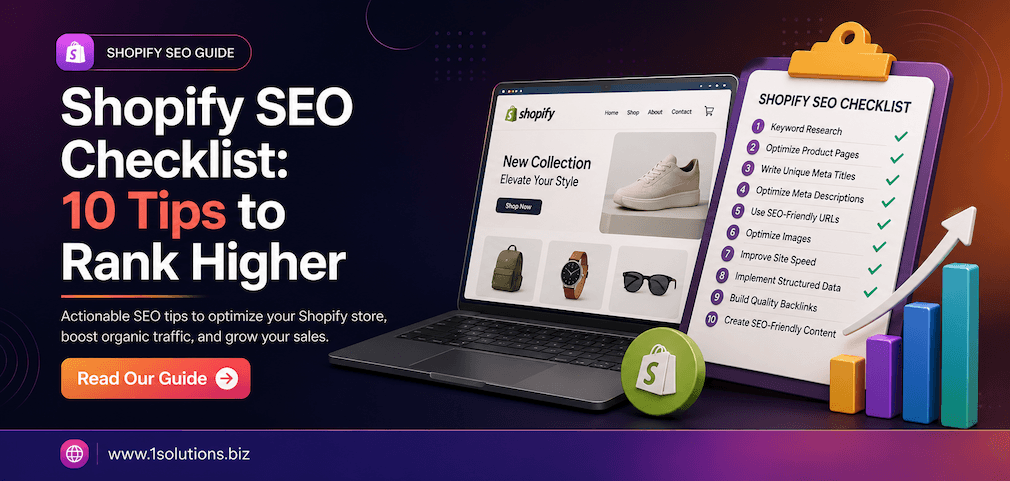
Shopify SEO Checklist: 10 Tips to Rank Higher in Search Results
If you run a Shopify store, organic search traffic is one of the most cost-effective channels you can invest in. Yet many store owners leave significant revenue on the table by skipping foundational optimization steps. This Shopify SEO checklist breaks down 10 proven, actionable tips to help your store climb the rankings, attract qualified buyers, and convert more traffic into sales. Whether you are launching a new store or auditing an existing one, these steps apply directly to the Shopify platform and current search engine requirements.
According to BrightEdge, organic search drives 53% of all website traffic, making it the single largest source of discoverable traffic across industries. For ecommerce specifically, getting SEO right is not optional. Let’s get into the checklist.
1. Conduct Thorough Keyword Research Before You Build or Optimize
Every strong Shopify SEO strategy starts with keyword research. Before you write a single product description or category page, you need to know exactly what your target customers are typing into Google.
What to Focus On
- Commercial intent keywords: Phrases like “buy running shoes online” or “best organic skincare products” signal purchase intent.
- Long-tail keywords: These are lower competition and often higher converting. For example, “men’s waterproof hiking boots size 11” is more specific than “hiking boots.”
- Collection page keywords: Map broader category terms to your collection pages and more specific terms to individual product pages.
Use tools like Google Keyword Planner, Ahrefs, or Semrush to find search volume and keyword difficulty. Prioritize keywords where your domain can realistically compete based on your current authority.
2. Optimize Your Shopify Store Structure and URL Architecture
Shopify automatically generates URLs, but the default structure is not always SEO-friendly. A clean, logical URL structure helps both search engines and users understand how your store is organized.
Best Practices for Shopify URL Structure
- Keep URLs short and descriptive: /collections/mens-running-shoes is better than /collections/col-2847
- Include your primary keyword in the URL where natural
- Avoid duplicate URLs by using canonical tags, which Shopify supports natively
- Note that Shopify forces the /products/ and /collections/ subfolders. This is a platform limitation, but it does not hurt rankings when managed correctly
A well-structured store also improves internal linking, which helps distribute authority from your homepage down to product pages. For a deeper look at how internal links amplify your SEO efforts, read our guide on how to use internal links to boost backlink impact.
3. Write Unique, Keyword-Rich Title Tags and Meta Descriptions
Title tags and meta descriptions are your first impression in search results. They directly influence click-through rates, which in turn affect your rankings.
Title Tag Guidelines
- Keep titles under 60 characters to avoid truncation in search results
- Place your primary keyword near the beginning of the title
- Include your brand name at the end for recognition: Blue Ridge Hiking Boots | TrailCo
Meta Description Guidelines
- Keep descriptions under 155 characters
- Include the primary keyword naturally
- Add a call to action: “Shop now,” “Free shipping over $50,” or similar
- Write a unique description for every page. Do not duplicate across products
In Shopify, you can edit title tags and meta descriptions directly from the product editor, collection editor, and theme settings. There is no excuse to leave these blank.
4. Optimize Product Pages With Detailed, Original Content
Thin content is one of the most common SEO problems on Shopify stores. Many merchants copy manufacturer descriptions word for word, which creates duplicate content issues and fails to differentiate their pages.
What a Strong Product Page Includes
- Original product description: At least 200 to 300 words covering features, benefits, use cases, and specifications
- Primary keyword in the first paragraph and naturally throughout the copy
- H1 tag: Shopify uses the product title as the H1 by default. Make it descriptive and keyword-relevant
- Structured data: Shopify themes often include product schema markup. Verify it renders correctly using Google’s Rich Results Test
- Customer reviews: User-generated content adds fresh, keyword-rich text and builds trust signals
According to Semrush’s State of Content Marketing Report (2023), long-form, detailed content consistently outperforms thin content in organic rankings across competitive niches.
5. Improve Page Speed and Core Web Vitals
Google officially made Core Web Vitals a ranking factor in 2021, and they remain critical today. Slow-loading pages frustrate users and reduce conversions. According to Google research (2022), a one-second delay in mobile page load time can reduce conversion rates by up to 20%.
Common Shopify Speed Issues and Fixes
- Image file sizes: Compress images before uploading. Use WebP format where possible. Shopify’s image CDN helps, but oversized source files still slow things down
- Too many apps: Every Shopify app that injects JavaScript into your storefront adds load time. Audit your installed apps and remove any you are not actively using
- Theme bloat: Avoid feature-heavy themes with excessive animations and scripts. Choose a lightweight, well-coded theme
- Lazy loading: Ensure images below the fold load lazily. Most modern Shopify themes support this by default
Use Google PageSpeed Insights and Shopify’s built-in speed report to identify specific bottlenecks. Aim for a Largest Contentful Paint (LCP) under 2.5 seconds and a Cumulative Layout Shift (CLS) score under 0.1.
6. Build a Strong Internal Linking Structure
Internal links pass authority between pages, help search engines crawl your site efficiently, and keep visitors engaged longer. Many Shopify stores underutilize this tactic.
Internal Linking Best Practices for Shopify
- Link from blog posts to relevant product and collection pages using keyword-rich anchor text
- Link between related products on product pages (“You may also like” or “Pairs well with”)
- Link from your homepage to your highest-priority collection pages
- Avoid orphaned pages, which are pages with no internal links pointing to them
Your blog is one of the most powerful internal linking tools available in Shopify. Publishing informational content that links to commercial pages creates a logical information hierarchy that search engines reward.
7. Build High-Quality Backlinks to Your Store
Backlinks remain one of Google’s top-three ranking factors. A Shopify store with strong backlinks from authoritative, relevant websites will consistently outrank competitors with better on-page optimization but weaker link profiles.
Effective Link Building Tactics for Ecommerce
- Product reviews and roundups: Reach out to bloggers and journalists who cover your niche and offer free samples in exchange for honest reviews
- Guest posting: Publish expert articles on industry publications with links back to relevant pages on your store. Learn more about how to secure high-quality guest post placements
- Competitor analysis: Identify where your competitors are earning links and pursue the same sources. Our guide on competitor backlink analysis walks you through this process step by step
- Digital PR: Create data-driven content, infographics, or original research that journalists want to cite
- Supplier and partner links: If you stock branded products, many manufacturers list authorized retailers on their websites
Be careful about the links you pursue. Low-quality or spammy links can trigger Google penalties. Read our resource on how to build links safely without triggering penalties to protect your store’s search visibility.
8. Optimize Images With Alt Text and Descriptive File Names
Images are a major part of any Shopify store, but they are frequently left unoptimized. Image SEO is a quick win that many store owners overlook entirely.
Image Optimization Checklist
- File names: Rename image files before uploading. Use descriptive, hyphenated names: blue-waterproof-running-shoes.jpg instead of IMG_4823.jpg
- Alt text: Write descriptive alt text for every product image. Include the product name and a relevant keyword where natural. Alt text also improves accessibility for visually impaired users
- File size: Keep images under 100KB where possible without sacrificing quality. Tools like TinyPNG or Shopify apps like Crush.pics can automate compression
- Image sitemaps: Shopify automatically includes images in your XML sitemap, which helps Google index them for image search
Google Images drives significant traffic for product-based searches. Optimized images can appear in both standard search results and image search, giving your store additional visibility.
9. Set Up and Monitor Google Search Console and Analytics
You cannot improve what you do not measure. Google Search Console and Google Analytics 4 are free tools that give you critical data about how your store performs in search.
What to Monitor in Google Search Console
- Coverage report: Identify and fix indexing errors, crawl issues, and pages blocked by robots.txt
- Performance report: Track impressions, clicks, average position, and click-through rates by page and keyword
- Core Web Vitals report: Monitor page experience signals across desktop and mobile
- Sitemaps: Submit your Shopify sitemap (yourdomain.com/sitemap.xml) to help Google discover all your pages
Key Metrics to Track in GA4
- Organic traffic by landing page
- Bounce rate and engagement rate for product and collection pages
- Conversion rate from organic traffic specifically
- Revenue attributed to organic search
Review these dashboards at least monthly. Tracking performance data allows you to spot drops in rankings quickly, identify pages that need optimization, and measure the ROI of your SEO efforts over time.
10. Publish a Regular Blog to Target Informational Keywords
Shopify includes a built-in blogging platform that most store owners rarely use. This is a significant missed opportunity. Informational blog content targets keywords at the top of the purchase funnel, builds topical authority, and earns backlinks that benefit your entire domain.
Blog Content Ideas for Shopify Stores
- “How to” guides related to your product category
- Buyer’s guides and comparison articles
- Product care and usage tutorials
- Industry news and trend articles
- Seasonal gift guides that include your products
Each blog post should target a specific keyword, include internal links to relevant product and collection pages, and provide genuinely useful information. According to HubSpot’s Marketing Statistics Report (2023), businesses that blog regularly generate 55% more website visitors than those that do not.
If you are also running paid campaigns alongside your SEO, consider how Google Shopping integrates with your organic strategy. Our guide on how to increase sales with Google Shopping Ads and our complete guide to Google Shopping cover paid visibility strategies that complement organic SEO efforts effectively.
Putting Your Shopify SEO Checklist Into Action
SEO is not a one-time project. It is an ongoing process that rewards consistency and attention to detail. This Shopify SEO checklist gives you a structured framework: start with technical foundations like site speed and URL structure, move to on-page optimization across product and collection pages, build your authority through backlinks and content, and track your results continuously.
The stores that win in organic search are not necessarily the ones with the biggest budgets. They are the ones that execute the fundamentals well and improve steadily over time. Start with the items on this list where your store has the biggest gaps, measure your progress, and build from there.
At 1Solutions, we have helped ecommerce brands grow their organic traffic for over 15 years. If you want expert guidance tailored to your specific Shopify store, our team is ready to help you build and execute an SEO strategy that drives real revenue.
Frequently Asked Questions
How long does it take to see results from Shopify SEO?
Most Shopify stores begin to see measurable improvements in organic traffic within three to six months of implementing a consistent SEO strategy. Highly competitive niches may take longer, while stores in less saturated markets can see movement within weeks. Technical fixes like improving page speed can have faster impacts than building domain authority through backlinks.
Does Shopify have built-in SEO features?
Yes, Shopify includes several built-in SEO features including auto-generated sitemaps, canonical tags, customizable title tags and meta descriptions, image CDN delivery, and structured data on product pages. However, built-in features alone are not sufficient to rank competitively. You need to actively optimize content, build backlinks, and manage technical performance.
What is the most important SEO factor for a Shopify store?
There is no single factor that outweighs everything else. However, keyword research lays the foundation for all other optimization work. Without knowing what your customers are searching for, even technically perfect pages will fail to attract the right traffic. Pair strong keyword targeting with quality content and authoritative backlinks for the best results.
Should I use a Shopify SEO app?
SEO apps like Plug in SEO, SEO Manager, or Smart SEO can help automate tasks like alt text generation, broken link detection, and meta tag management. They are useful productivity tools, but they do not replace strategic SEO work. Use apps to support your workflow, not as a substitute for actual optimization.
How does blogging help Shopify SEO?
Blogging helps Shopify SEO in three primary ways. First, it allows you to target informational keywords that product and collection pages cannot rank for. Second, blog content earns backlinks from other websites, which improves your domain authority. Third, internal links from blog posts to product pages pass authority and help those commercial pages rank higher. A consistent blogging schedule compounds in value over time.