What Is DevOps and How Does It Work?
If you have spent any time around software teams or web development projects, you have probably heard the term DevOps thrown around. But understanding DevOps and how does it work in practical, day-to-day terms is something many teams still struggle with. DevOps is not just a toolset or a job title. It is a cultural and technical movement that changes how software is built, tested, delivered, and maintained. Whether you run a small startup or manage a large enterprise development team, the principles behind DevOps directly affect how fast and reliably your products reach users.
This guide breaks down DevOps into 10 clearly explained points, covering everything from its core philosophy to the tools that power it and the real trade-offs you should know before adopting it.
DevOps is a set of practices that combines software development and IT operations to shorten delivery cycles and improve product quality. It works through automation, collaboration, continuous integration, and continuous delivery. This guide covers 10 essential points to help you understand what DevOps is and how it works in real environments.
⚡ Key Takeaways
- DevOps bridges the gap between development and operations teams using shared goals and automation.
- Continuous Integration and Continuous Delivery (CI/CD) are the operational backbone of any DevOps pipeline.
- DevOps adoption can reduce deployment times significantly, but it requires genuine cultural change, not just new tools.
- Infrastructure as Code (IaC) allows teams to manage servers and environments the same way they manage application code.
- Monitoring and observability are not optional additions. They are core to the DevOps feedback loop.
- Security must be embedded into the pipeline from the start, a practice known as DevSecOps.
- DevOps works best when teams commit to iteration and learning, not just speed for its own sake.
1. The Core Definition: What DevOps Actually Means
DevOps is the combination of cultural philosophies, practices, and tools that increases an organization’s ability to deliver applications and services at high velocity. The word itself is a blend of “Development” and “Operations,” representing the merging of two teams that historically worked in silos. Developers wrote code and threw it over the wall to operations, who then struggled to deploy and maintain it. DevOps tears down that wall.
According to the 2023 State of DevOps Report by DORA (DevOps Research and Assessment), elite DevOps teams deploy code 973 times more frequently than low performers and recover from incidents 6,570 times faster. Those are not marginal improvements. They represent a fundamentally different way of operating.
At its heart, DevOps is about shared responsibility. Developers care about how their code performs in production. Operations teams are involved in design decisions early. Both groups use the same tools, speak the same language, and measure success with the same metrics. This cultural shift is often harder than the technical side, and organizations that treat DevOps as purely a tooling exercise tend to see limited results. The practices only deliver their full value when the people and processes align first.
💡 Pro Tip: Before buying any DevOps tools, audit your team’s communication patterns. If developers and operations staff rarely talk outside of incidents, no pipeline will fix that gap on its own.
2. The DevOps Lifecycle: Eight Phases Explained
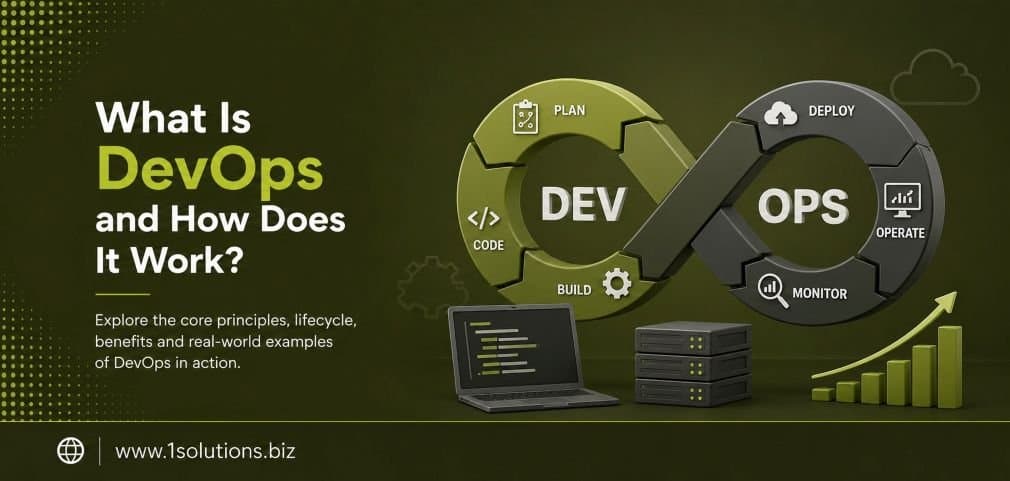
DevOps does not operate in a straight line. It operates in a continuous loop, often illustrated as an infinity symbol. This loop represents the eight phases of the DevOps lifecycle: Plan, Code, Build, Test, Release, Deploy, Operate, and Monitor. Each phase feeds into the next, and monitoring feeds back into planning, which is what makes the whole system self-improving over time.
During the Plan phase, teams define features, requirements, and sprint goals. In the Code phase, developers write and commit code to a shared repository. The Build phase compiles that code into executable artifacts. Testing verifies that the build works as expected, both functionally and in terms of security. Release prepares the artifact for deployment, Deploy pushes it to production, Operate keeps it running, and Monitor tracks performance and user behavior.
The power of this lifecycle is that it is never truly finished. A bug caught in monitoring triggers a new planning cycle. User feedback reshapes the next sprint. This iterative rhythm is what separates DevOps from traditional waterfall development, where phases happened once, in sequence, with long gaps between releases. Understanding this continuous loop is essential to understanding DevOps and how does it work as a system rather than a process. Teams who skip the monitoring phase, in particular, lose the feedback signal that makes everything else smarter.
3. Continuous Integration: Merging Code Without the Chaos
Continuous Integration, commonly called CI, is the practice of frequently merging code changes from multiple developers into a shared repository. Each merge triggers an automated build and test sequence. The goal is to catch integration problems early, before they compound into complex, hard-to-debug failures.
Before CI became standard, teams worked on separate feature branches for weeks or months. When they finally merged, they faced what developers call “merge hell,” a tangle of conflicts and broken code that could take days to untangle. CI eliminates this by making integration a daily, sometimes hourly, activity. Popular CI tools include Jenkins, CircleCI, GitHub Actions, and GitLab CI.
A well-configured CI pipeline typically runs unit tests, integration tests, static code analysis, and security scans automatically on every commit. If any check fails, the developer gets immediate feedback and can fix the issue while the code is still fresh in their mind. This dramatically reduces the cost of bugs. According to IBM Systems Sciences Institute (2022), fixing a bug found in production costs 15 times more than fixing it during development. CI is one of the most cost-effective investments a development team can make, though it does require upfront work to write meaningful automated tests and maintain the pipeline as code evolves.
4. Continuous Delivery and Continuous Deployment: The Other Half of CI/CD
Continuous Delivery (CD) extends CI by ensuring that every code change that passes automated tests is ready to be released to production at any time. The deployment itself still requires a human trigger. Continuous Deployment takes it one step further: every change that passes tests is automatically deployed to production without manual approval.
The distinction matters. Continuous Delivery gives teams the confidence and the option to release frequently. Continuous Deployment removes the option entirely and automates the final step. Not every organization is ready for full continuous deployment. Regulated industries, complex enterprise systems, or teams with less mature test coverage may prefer Continuous Delivery, where a human still presses the button.
The combined CI/CD pipeline is the operational spine of DevOps. It represents the technical mechanism through which the cultural values of speed, quality, and collaboration become real. Teams using mature CI/CD pipelines can deploy multiple times per day with low failure rates. This directly supports the ability to experiment, iterate, and respond to user needs faster than competitors who release on quarterly schedules. If you are building or scaling a web product, understanding CI/CD is non-negotiable. It is the engine under the hood of modern software delivery, and it connects directly to how fast your digital presence can evolve and improve.
5. Infrastructure as Code: Managing Servers Like Software
Infrastructure as Code, or IaC, is the practice of managing and provisioning computing infrastructure through machine-readable configuration files rather than manual processes or interactive configuration tools. Instead of logging into a server and clicking through a control panel to set up an environment, you write a script that does it automatically, consistently, and repeatably.
Tools like Terraform, Ansible, Puppet, and AWS CloudFormation are widely used for IaC. The configuration files live in version control alongside application code, which means every change to infrastructure is tracked, reviewable, and reversible, just like code changes.
IaC solves a problem that plagued operations teams for decades: the “snowflake server.” Each server was configured slightly differently by different people over time, making it impossible to reliably reproduce environments or troubleshoot problems. With IaC, every environment, whether development, staging, or production, is built from the same template. This consistency is one of the reasons DevOps teams can deploy frequently with high confidence. It also supports disaster recovery: if a server fails, you do not need to remember how it was configured. You just run the script again. The trade-off is that IaC requires developers and operations staff to learn new tools and think about infrastructure as a software problem, which has a real learning curve.
💡 Pro Tip: Store all IaC configuration files in the same repository as your application code. This keeps environment changes visible to the whole team and makes rollbacks straightforward.
6. Containerization and Orchestration: Docker and Kubernetes
Containers are lightweight, portable units that package an application and all its dependencies together. Unlike virtual machines, containers share the host operating system kernel, making them faster to start and more efficient with resources. Docker is the most widely used containerization platform, and it has become nearly synonymous with modern DevOps workflows.
Containers solve a classic problem: “it works on my machine.” Because the container includes everything the application needs to run, it behaves the same way in development, testing, and production. This consistency eliminates a whole category of environment-related bugs.
When you have many containers running across many servers, you need a way to manage them. That is where orchestration tools like Kubernetes come in. Kubernetes automates the deployment, scaling, and management of containerized applications. It can automatically restart failed containers, distribute load across healthy instances, and roll out updates without downtime. According to the Cloud Native Computing Foundation (CNCF) Annual Survey 2023, 96% of organizations are either using or evaluating Kubernetes, making it the dominant orchestration standard. The complexity of Kubernetes is a genuine challenge. It has a steep learning curve and operational overhead. Smaller teams should honestly assess whether they need it or whether simpler managed container services meet their needs without the added complexity.
7. Monitoring, Observability, and the Feedback Loop
Deploying code is only half the job. Knowing how that code behaves in production is equally important, and this is where monitoring and observability come in. Monitoring tracks predefined metrics: CPU usage, memory, error rates, response times. Observability goes deeper, giving teams the ability to ask arbitrary questions about system behavior using logs, metrics, and distributed traces.
The three pillars of observability are logs (records of discrete events), metrics (numerical measurements over time), and traces (records of how requests travel through distributed systems). Tools like Prometheus, Grafana, Datadog, and the ELK Stack (Elasticsearch, Logstash, Kibana) are commonly used to build observability into DevOps pipelines.
The reason monitoring is treated as a core DevOps practice rather than an afterthought is the feedback loop. When something breaks in production, teams with strong observability can pinpoint the cause in minutes. Teams without it spend hours guessing. More importantly, monitoring data feeds back into the planning phase, informing decisions about where to invest engineering effort, which features are being used, and which parts of the system are fragile. This connection between production behavior and future development is what gives DevOps its self-improving character. Just as understanding your digital performance requires data-driven analysis, as explored in resources like how to boost your SEO efforts with page content analysis, DevOps teams use observability data to make smarter decisions about every next step.
8. DevSecOps: Embedding Security Into the Pipeline
Security has traditionally been treated as a gate at the end of the development process. A security team reviews the code before release, finds problems, and sends it back. This approach creates bottlenecks, slows delivery, and often results in security being skipped under deadline pressure. DevSecOps changes this by embedding security practices directly into every stage of the DevOps lifecycle.
In a DevSecOps pipeline, automated security scans run on every code commit. Dependency vulnerability checks flag known issues in third-party libraries. Infrastructure configurations are scanned for security misconfigurations. Penetration testing is automated where possible and scheduled regularly for deeper assessments. Security becomes everyone’s responsibility, not just the security team’s.
This shift is increasingly necessary. The frequency of software supply chain attacks has grown significantly, with Gartner (2023) predicting that by 2025, 45% of organizations worldwide will have experienced attacks on their software supply chains, up from 15% in 2021. Shifting security left, meaning earlier in the process, reduces the cost and impact of vulnerabilities. The honest trade-off is that it requires developers to build security skills and for security teams to adapt from gatekeepers to enablers. This culture change is often more challenging than implementing the technical controls themselves. Organizations that treat DevSecOps as purely a tooling problem will find their pipelines full of alerts that nobody acts on.
9. Key DevOps Tools: A Practical Overview
Understanding DevOps and how does it work also means knowing the tools that make it operational. The DevOps toolchain typically spans several categories: source control, CI/CD, containerization, configuration management, monitoring, and collaboration. No single vendor covers all of these, so teams assemble toolchains based on their stack and needs.
| Category | Common Tools | Primary Purpose |
|---|---|---|
| Source Control | Git, GitHub, GitLab, Bitbucket | Version control and code collaboration |
| CI/CD | Jenkins, GitHub Actions, CircleCI, GitLab CI | Automated build, test, and deployment |
| Containerization | Docker, Podman | Portable application packaging |
| Orchestration | Kubernetes, Docker Swarm, Nomad | Container management at scale |
| Infrastructure as Code | Terraform, Ansible, Puppet, Chef | Automated infrastructure provisioning |
| Monitoring | Prometheus, Grafana, Datadog, New Relic | Performance and health visibility |
| Collaboration | Jira, Slack, Confluence | Planning and communication |
Choosing the right tools depends on team size, existing infrastructure, budget, and technical maturity. Open-source options like Jenkins and Prometheus are powerful but require more maintenance. Managed services like GitHub Actions or Datadog reduce operational burden at higher cost. The best toolchain is the one your team will actually use consistently. Just as choosing between platforms matters in web development, as covered in comparisons like WooCommerce vs Shopify, the right DevOps tooling choice depends on context, not universal best practices. Teams should also consider how emerging technologies interact with their pipelines. Understanding how AI-powered tools are changing workflows, as discussed in agentic browsers and how they work, is increasingly relevant as automation becomes more intelligent.
10. DevOps and Business Outcomes: What It Actually Delivers
The ultimate reason organizations adopt DevOps is not because it is technically elegant. It is because it delivers measurable business results. Faster time to market, higher deployment frequency, lower change failure rates, and faster incident recovery all translate directly into competitive advantage, lower costs, and better user experiences.
Organizations with mature DevOps practices release software far more often than those without. They recover from failures faster, meaning less downtime and lower impact on users. They also report higher employee satisfaction, because developers spend less time firefighting and more time building. For businesses that depend on their digital presence, whether through content, ecommerce, or web applications, the connection between DevOps maturity and business performance is direct. A slow, unreliable deployment process means slower response to market changes, slower feature releases, and more time spent on maintenance rather than growth.
For teams working on digital marketing infrastructure or content platforms, DevOps principles can also improve how websites are maintained and updated. If your team is looking to scale digital output reliably, working with specialists who understand both technical delivery and growth, such as through professional WordPress development services or integrated digital marketing services, can bridge the gap between engineering efficiency and business results. The honest caveat: DevOps transformation takes time. Most organizations see significant results within one to two years, but the cultural changes can take longer. Expecting overnight results leads to disappointment and premature abandonment of practices that genuinely work. Just as understanding how search visibility evolves requires patience, as seen in discussions of why Google might not be indexing your pages, DevOps maturity is a journey measured in quarters, not sprints.
💡 Pro Tip: Start measuring four key DevOps metrics from day one: deployment frequency, lead time for changes, change failure rate, and mean time to recovery. These DORA metrics give you an honest baseline and make progress visible over time.
Practical Action Plan: Where to Start With DevOps
- Do This Now: Set up a basic CI pipeline using GitHub Actions or GitLab CI. Even a simple pipeline that runs tests on every pull request will immediately improve code quality and catch regressions early. This is the highest-leverage starting point with the lowest barrier to entry.
- Worth Doing: Containerize your primary application using Docker and document your environment setup as code. This removes environment inconsistency as a source of bugs and makes onboarding new developers faster. Pair this with a monitoring setup using Prometheus and Grafana so you have visibility into production from day one.
- Low Priority: Full Kubernetes orchestration, advanced service meshes, and chaos engineering are powerful but complex. These are worth pursuing once your CI/CD pipeline is stable, your team is comfortable with containers, and you have meaningful observability in place. Rushing to these tools without the foundations causes more problems than it solves.
Conclusion
Understanding DevOps and how does it work is no longer optional for teams building software products or managing digital infrastructure at any meaningful scale. From the cultural shift of shared responsibility, through the technical practices of CI/CD, IaC, containerization, and observability, to the security discipline of DevSecOps, DevOps represents a comprehensive rethinking of how software is built and operated. It is not a silver bullet. It requires investment in culture, tooling, and skills. But the teams that commit to it deliver better software, faster, with fewer failures. That combination is hard to argue against, regardless of the size of your organization or the nature of your product. For digital teams looking to align their technical delivery with their marketing and growth goals, exploring resources on improving website visibility in AI search engines and how new protocols affect web infrastructure, like WebMCP and its impact on SEO, can help connect DevOps investments to tangible business outcomes.
Frequently Asked Questions About DevOps
Is DevOps only relevant for large companies?
No. DevOps principles scale down effectively. Small teams often benefit the most from CI/CD pipelines and IaC because they have fewer people to catch errors manually. The tools are mostly open-source, and the cultural shift is simpler with a smaller group. The key is to adopt practices proportionate to your team size and complexity, not to replicate what large enterprises do.
How long does it take to implement DevOps?
A basic CI pipeline can be set up in a day. A mature DevOps culture, with full CI/CD, IaC, observability, and DevSecOps, typically takes one to three years to develop. The technical pieces move faster than the cultural ones. Setting realistic expectations and celebrating incremental progress is important for sustaining momentum through the transition.
What is the difference between DevOps and Agile?
Agile is a software development methodology focused on iterative development, customer collaboration, and responding to change. DevOps extends beyond development to include operations and the full delivery lifecycle. They are complementary. Most DevOps teams use Agile practices like sprints and retrospectives, but DevOps adds the operational dimension of how software is deployed and run in production.
Do you need to know coding to work in DevOps?
Some coding knowledge is genuinely useful. Writing pipeline configurations, IaC scripts, and automation requires familiarity with scripting languages like Bash, Python, or YAML. However, the depth of coding skill needed varies by role. A DevOps engineer focused on infrastructure needs different skills than one focused on CI/CD pipeline development. Many entry points exist for people with operational backgrounds who are willing to learn scripting fundamentals.
What are the biggest mistakes teams make when adopting DevOps?
The most common mistake is treating DevOps as a tooling initiative rather than a cultural one. Buying tools without changing how teams communicate and share responsibility produces limited results. Other common mistakes include skipping automated testing, which makes CI/CD unreliable, neglecting monitoring until something breaks, and trying to implement everything at once instead of starting with high-value, low-complexity practices like basic CI pipelines.