What Are Facebook Lookalike Audiences and Why Do They Still Matter?
When you want to reach people who are most likely to buy from you, guessing is expensive. Facebook Lookalike Audiences solve that problem by letting you create Facebook Lookalike Audiences that mirror your best existing customers. Instead of targeting broadly by interest or demographics, you give Meta’s algorithm a sample of your highest-value users and it finds millions of similar people across its platform.
Even with evolving privacy changes and iOS tracking limitations, Lookalike Audiences remain one of the strongest tools in paid social. According to Meta (2024), advertisers who use Lookalike Audiences see an average of 55% lower cost per conversion compared to broad interest targeting alone. That is not a small difference. It reflects how powerful behavioral pattern matching can be when it is built on a clean, relevant source audience.
Facebook Lookalike Audiences let you find new customers who share traits with your best existing ones. This guide walks you through every step: choosing the right source audience, setting the right audience size, combining Lookalikes with other targeting, and avoiding common mistakes that waste your budget.
⚡ Key Takeaways
- Your source audience quality matters far more than the size. Seed it with your highest-value customers, not just any email list.
- A 1-3% Lookalike size works best for high-intent campaigns. Go wider (5-10%) for awareness and reach campaigns.
- Custom Audiences from your website pixel, purchase events, or video viewers usually produce stronger Lookalikes than uploaded email lists alone.
- Always layer Lookalike Audiences with exclusions to avoid wasting budget on existing customers.
- Test at least two to three Lookalike sources simultaneously to find which seed delivers the best results.
- Privacy updates have made first-party data more valuable. Build your own customer lists actively.
- Refresh your source audience every 30 to 60 days to prevent audience decay and ad fatigue.
How Lookalike Audiences Actually Work
Meta’s algorithm analyzes hundreds of signals from your source audience: interests, behaviors, purchase history on Facebook, page interactions, device usage, and more. It then scans its user base and ranks accounts by similarity score. When you choose a 1% Lookalike, you are selecting the top 1% most similar users in a given pool. A 10% Lookalike is broader and less precise but gives you a larger reach.
According to Hootsuite’s Digital 2024 report, Facebook has 3.07 billion monthly active users. Even a 1% Lookalike can represent tens of millions of potential customers depending on your location settings. That scale is what makes this tool so valuable for growth-focused advertisers.
The process depends entirely on your source Custom Audience. If you are not familiar with the basics of Facebook advertising setup, our detailed walkthrough on how to advertise on Facebook covers the foundational steps before you build any audience type.
Step 1: Choose and Build Your Source Audience
The source audience is the backbone of any Lookalike campaign. Meta recommends a source audience of between 1,000 and 50,000 people. You do not need hundreds of thousands. What you need is quality and relevance.
Here are the strongest source types, ranked by performance:
- Pixel-based purchase audiences: People who completed a purchase event on your site. This is the gold standard because it reflects actual buying behavior.
- High-LTV customer list: Upload a CSV of your top customers filtered by lifetime value. Meta’s value-based Lookalike feature can weight similarity toward high spenders.
- Video viewers: People who watched 75% or more of a specific video ad. These users have demonstrated strong intent.
- Lead form completions: Users who filled out a native Facebook lead form. Useful for service businesses.
- Email list uploads: Your newsletter subscribers or CRM contacts. Match rates vary (typically 40-60%), so results depend on list hygiene.
Avoid using broad page fans as your seed unless your page engagement is highly targeted. A page with 100,000 loosely acquired followers will produce a diluted Lookalike.
💡 Pro Tip: If you have fewer than 500 website purchasers in the last 180 days, combine your pixel purchase audience with a high-LTV customer list upload to hit a stronger sample size before building your Lookalike.
Step 2: Create a Custom Audience First
You cannot create a Lookalike directly from raw data. You must first create a Custom Audience that becomes your seed. Here is how to do it:
- Go to Meta Ads Manager and click the grid icon to open Audiences.
- Click Create Audience, then select Custom Audience.
- Choose your source type: Website, Customer List, App Activity, Video, Instagram Account, or Facebook Page.
- For website audiences, select your pixel, then choose the event (Purchase, Add to Cart, View Content) and the time window (typically 30, 60, or 180 days).
- Name your Custom Audience clearly. Example: “Purchasers Last 60 Days” or “High LTV Customers Q1 2026.”
- Click Create Audience and wait for it to populate. This can take up to 24 hours.
For customer list uploads, make sure your CSV includes email, phone number, first name, and last name at minimum. More identifiers improve the match rate. Meta hashes all data before processing, so privacy is maintained on their end.
Step 3: Create the Facebook Lookalike Audience
Once your Custom Audience is ready, you can build the Lookalike. Here is the exact process:
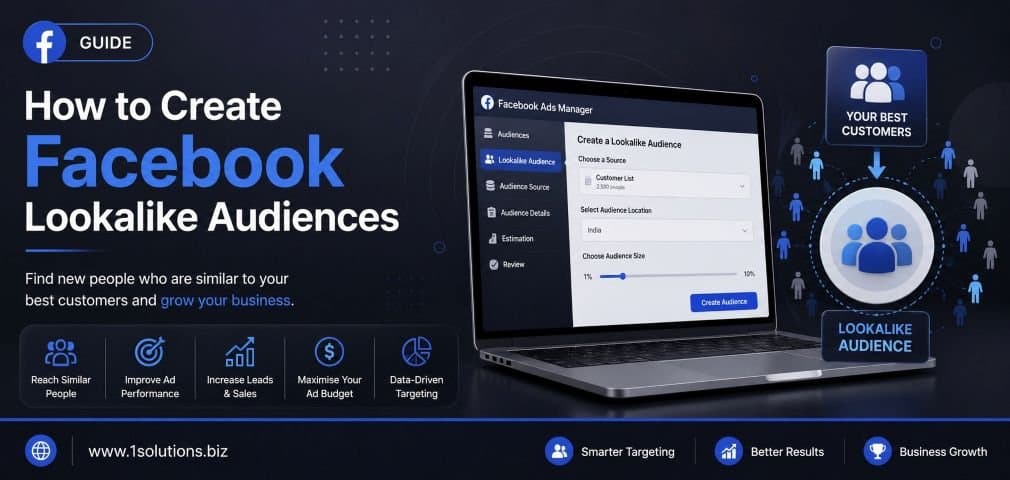
- In Audiences, click Create Audience and select Lookalike Audience.
- Under Source, select the Custom Audience you just built.
- Choose your target location. This is the pool Meta will search within.
- Set your audience size using the 1-10% slider. Start with 1% for conversion campaigns, or 3-5% for scaling.
- You can create multiple sizes at once (1%, 2%, 3%) to test simultaneously.
- Click Create Audience. The Lookalike usually populates within 6 to 24 hours.
One thing to keep in mind: Meta does not let you see who is in a Lookalike Audience. You are trusting the algorithm. This is both the strength and the limitation of the tool. You are buying into the model, not the specific people.
Step 4: Understand Audience Size Percentages
The percentage slider controls how similar your Lookalike is to your seed audience. Here is a breakdown of what each range is best suited for:
| Lookalike Size | Similarity Level | Best For | Typical Reach |
|---|---|---|---|
| 1% | Very High | Conversion, purchase campaigns | Smaller, more targeted |
| 2-3% | High | Retargeting warm audiences, scaling winners | Moderate |
| 4-6% | Medium | Lead generation, mid-funnel content | Broader |
| 7-10% | Lower | Brand awareness, top-of-funnel reach | Largest, least precise |
Many experienced advertisers start at 1% to validate performance, then scale to 2-5% once the creative and offer are proven. Jumping straight to 10% without testing wastes budget because precision drops significantly.
Step 5: Layer Additional Targeting and Exclusions
A Lookalike Audience is not a finished targeting strategy on its own. You need to layer it correctly.
Add Interest or Behavioral Filters
In some cases, layering a relevant interest on top of a Lookalike can improve precision. However, be careful. Over-narrowing a Lookalike defeats its purpose. Use this sparingly, mainly when your Lookalike pool is very large and your budget is limited.
Exclude Existing Customers
Always exclude your existing customer Custom Audience from your Lookalike campaigns. If you are paying to reach someone who already bought from you, that is wasted spend. Create an exclusion at the ad set level by clicking Exclude under the audience section and selecting your customer list or purchaser Custom Audience.
Exclude Recent Website Visitors in Separate Retargeting Campaigns
If you run retargeting separately (which you should), exclude those audiences from your Lookalike campaigns to prevent overlap. Meta’s Audience Overlap tool under the Audiences menu can help you check for cannibalization between your audience segments.
💡 Pro Tip: Run your Lookalike campaigns and retargeting campaigns in separate ad sets or campaigns. This gives you cleaner data, avoids auction overlap, and makes optimization far easier.
Step 6: Test Multiple Lookalike Sources at Once
One of the most common mistakes advertisers make is building a single Lookalike and assuming it is optimal. Different seed audiences produce genuinely different results. Here is a testing structure that works:
- Lookalike A: Seeded from 60-day purchasers (pixel-based)
- Lookalike B: Seeded from high-LTV customer CSV upload
- Lookalike C: Seeded from 75% video viewers of your best-performing ad
Run all three at the same budget for 7 to 14 days. Let Meta’s delivery system optimize, and then analyze cost per result. The winner becomes your primary audience. The others can either be retired or used for secondary objectives.
According to WordStream (2024), advertisers who A/B test their audience sources see a 30% improvement in cost-per-acquisition within the first 30 days of structured testing. That is a significant return for a relatively simple process.
Step 7: Maintain and Refresh Your Audiences
Lookalike Audiences degrade over time. As your business grows and your customer base evolves, your seed audience shifts. If you created a Lookalike six months ago based on an old customer list, it may no longer reflect your current best customers.
Best practices for maintenance:
- Refresh your customer list upload every 30 to 60 days with updated purchase data.
- Set pixel-based Custom Audiences to rolling 30-day or 60-day windows so they update automatically.
- Delete Lookalikes older than 90 days if you have not refreshed the underlying seed.
- Monitor audience size in the Audiences dashboard. A shrinking audience may signal tracking issues with your pixel.
If you are running an ecommerce store and want to make Lookalike Audiences work harder for your product catalog campaigns, pairing them with dynamic ads is especially powerful. Our ecommerce marketing services cover how to integrate audience strategies with full-funnel paid social campaigns for online retailers.
€警; Warning: Lookalike Audiences built from low-quality seed data will underperform even with perfect ad creative. If your conversion rate is below 1-2% on a 1% Lookalike, audit your source audience before blaming the creative or the offer.
Common Mistakes to Avoid When Creating Lookalike Audiences
Even experienced advertisers make these errors. Knowing them upfront saves budget and time.
- Using too small a seed: Under 100 people in your source audience is not enough data for Meta to build a strong model. Wait until you have at least 500 to 1,000 before creating the Lookalike.
- Not excluding existing customers: As mentioned, always add exclusions. Otherwise you are paying to reach people who already converted.
- Treating 1% as always best: On very small budgets or in niche verticals, even 1% may be too broad. Testing matters more than assumptions.
- Overlapping audiences across ad sets: Multiple ad sets targeting the same Lookalike compete against each other in Meta’s auction, raising your own costs. Use Campaign Budget Optimization (CBO) or consolidate ad sets.
- Ignoring value-based Lookalikes: If you have purchase value data in your pixel or CRM, use Meta’s value-based Lookalike feature. It weights the seed toward high-value customers rather than treating all purchasers equally.
Value-Based Lookalike Audiences: The Advanced Option
Meta offers a value-based Lookalike option that uses customer lifetime value as a weighting signal. Instead of just finding people similar to your buyers, it finds people similar to your highest-spending buyers. This requires:
- A customer list CSV with a “value” column representing purchase value or LTV.
- At least 100 customers with value data (1,000 recommended for accuracy).
- The value field must be a positive number in a consistent currency.
To create one, follow the same Custom Audience steps but select “Include LTV for better performing Lookalikes” when uploading your customer list. Meta will prompt you to map the value column. Once the Custom Audience is created, proceed with the standard Lookalike creation flow and the algorithm will factor value into its matching model.
This is particularly effective for subscription businesses, SaaS companies, and ecommerce stores with wide variation in customer spending. A customer who spent once at low value is very different from a repeat buyer who spends 10x more, and your Lookalike should reflect that.
How Lookalike Audiences Fit Into a Full Funnel Strategy
Lookalike Audiences are a prospecting tool. They belong at the top of your funnel, working alongside retargeting and retention campaigns. A complete structure looks like this:
- Top of Funnel (Prospecting): Lookalike Audiences at 1-3% with awareness or traffic objectives. Goal: introduce new users to your brand.
- Middle of Funnel (Retargeting): Website visitors, video viewers, and page engagers who have not converted yet. Goal: move them closer to purchase.
- Bottom of Funnel (Conversion): Cart abandoners, checkout starters, high-intent signals. Goal: close the sale.
- Retention: Existing customers with upsell or loyalty offers. This audience should be excluded from all Lookalike campaigns.
Lookalikes power the top layer by constantly feeding new qualified users into the funnel. Without strong prospecting, your retargeting pool shrinks over time and campaign performance declines. This is why many brands allocate 40-60% of their paid social budget to top-of-funnel Lookalike campaigns.
For more context on how social media platforms fit into a broader digital strategy, our guide to top social media platforms breaks down where Facebook sits relative to other channels. And if you want to see how to pair your paid strategy with organic social efforts, our Facebook management services cover both paid and organic as an integrated system.
Practical Action Plan: How to Prioritize Your Next Steps
- Do This Now: Audit your Meta pixel and confirm purchase events are firing correctly. Without accurate pixel data, your Lookalike seed is unreliable. Check Events Manager in Ads Manager and resolve any warnings immediately.
- Do This Now: Create a Custom Audience of 60-day purchasers and export your top 1,000 customers by revenue from your CRM or ecommerce platform. These two sources will become your first Lookalike seeds.
- Worth Doing: Set up a value-based Lookalike using your LTV customer CSV if you have 500 or more customers with purchase value data. This will take one to two hours and typically outperforms standard Lookalikes within 30 days of testing.
- Worth Doing: Structure your campaigns to separate prospecting (Lookalike) from retargeting into distinct campaigns. Add exclusion audiences at the ad set level. This cleanup alone often reduces wasted spend by 15-25%.
- Low Priority: Experiment with video viewer Lookalikes once you have conversion-based campaigns running. These are valuable but require existing video creative assets and a moderate video ad budget to build a meaningful seed audience first.
If you are scaling a paid social strategy and want expert support across the whole funnel, the team at 1Solutions offers comprehensive digital marketing services that include paid social, audience strategy, and conversion optimization working together.
Conclusion: Create Facebook Lookalike Audiences That Actually Convert
The ability to create Facebook Lookalike Audiences that consistently deliver results comes down to three things: the quality of your source data, the structure of your campaign setup, and the discipline of ongoing testing and refreshing. There is no shortcut. A 1% Lookalike built from a clean purchase audience will almost always outperform a 1% Lookalike built from a generic page like list, even if the numbers look similar on paper.
Start with your best customers, exclude the right people, test multiple seed sources, and maintain your audiences on a regular schedule. That process, repeated consistently, is what separates advertisers who treat Lookalikes as a one-time tactic from those who use them as a scalable growth engine.
Also, remember that Lookalike Audiences work best when paired with strong ad creative and a high-converting landing page. The audience gets the right people in front of your ad. Your creative and your offer convert them. Both sides of that equation need attention.
Frequently Asked Questions
How large should my source audience be to create a good Lookalike?
Meta recommends between 1,000 and 50,000 people for the best results. Technically you can create a Lookalike from as few as 100 users, but the quality drops significantly below 500. For value-based Lookalikes, 1,000 customers with LTV data is the recommended minimum.
How long does it take for a Lookalike Audience to populate?
Most Lookalike Audiences populate within 6 to 24 hours. Larger audience pools or source audiences that require significant matching (such as large email list uploads) can take up to 48 hours in some cases. You will see a status indicator in the Audiences section of Ads Manager.
Can I use a Lookalike Audience without a Facebook pixel?
Yes. You can create Lookalikes from customer list uploads, video viewer audiences, page engagers, and lead form submissions without relying on the pixel. However, pixel-based purchase audiences consistently produce the strongest Lookalikes because they capture verified buying behavior. If you have not installed your pixel yet, that should be your first priority.
Do Lookalike Audiences update automatically?
Lookalikes built from pixel-based Custom Audiences with rolling time windows (such as 30-day purchasers) update dynamically as new users enter and exit the window. Lookalikes built from static uploads (customer CSVs) do not update automatically. You need to re-upload the list and rebuild the Lookalike periodically, typically every 30 to 60 days.
How do Lookalike Audiences perform with limited cookie and tracking data due to iOS changes?
iOS 14.5 and subsequent updates reduced the accuracy of pixel-based tracking for some advertisers. The best response is to rely more on first-party data (your own customer lists and CRM exports) and to use Meta’s Conversions API alongside the pixel. The Conversions API sends event data server-side, reducing the impact of browser-level tracking limitations. Value-based Lookalikes built on clean first-party CRM data have become more important precisely because of these changes.