If your NYC clinic is not showing up in Google’s local pack, you are handing patients to your competitors every single day. A solid GMB optimization checklist is the fastest way to close that gap. Google Business Profile (formerly Google My Business) is the single most influential factor in local search visibility for healthcare providers, and most clinics leave a shocking amount of value on the table by treating it as a “set it and forget it” tool. This guide gives you 10 fully explained, actionable steps built specifically for New York City clinics, from urgent care and dental offices to dermatology and physical therapy practices.
NYC clinics that consistently optimize their Google Business Profile earn more local search visibility, higher patient trust, and more booked appointments. This checklist covers the 10 most impactful GMB actions, from profile completeness and photo strategy to review management and Q&A moderation, so your clinic can compete in one of the most crowded healthcare markets in the country.
⚡ Key Takeaways
- Complete GMB profiles receive significantly more direction requests and website clicks than incomplete ones.
- Choosing the right primary and secondary categories directly controls which local searches trigger your listing.
- Patient reviews with keyword-rich responses improve both trust signals and local ranking signals.
- Posting weekly Google Business updates keeps your profile active and signals relevance to Google’s algorithm.
- Photos and virtual tours increase engagement rates and reduce patient drop-off before booking.
- Consistent NAP (Name, Address, Phone) data across all directories prevents ranking dilution.
- The Q&A section is a hidden content opportunity that most NYC clinics completely ignore.
Why NYC Clinics Need a Dedicated GMB Optimization Checklist
New York City has more licensed healthcare providers per square mile than almost any other metro area in the world. That density means local search competition is extreme. According to BrightLocal (2023), 98% of consumers used the internet to find local business information, and healthcare was among the top three most-searched categories. Meanwhile, Google’s own data shows that “near me” searches for health services grew over 500% in recent years. If your Google Business Profile is not fully optimized, you are invisible to patients who are actively searching right now. The 10 steps below form a practical, repeatable checklist you can audit monthly.
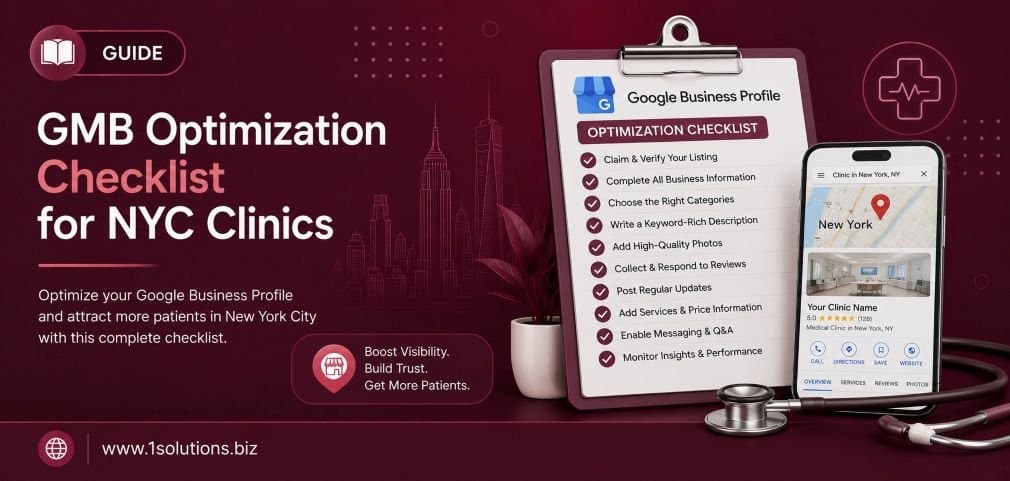
The Complete GMB Optimization Checklist: 10 Steps for NYC Clinics
1. Claim and Verify Your Google Business Profile Fully
Before anything else, you must confirm that your clinic’s profile is officially claimed and verified. Unverified profiles cannot be edited, cannot rank competitively, and are vulnerable to being suggested edits by strangers, including competitors. Go to Google Business Profile Manager, search for your clinic, and if it has not been claimed, initiate the verification process. Google typically offers postcard verification for physical locations, though phone and email verification are available for some accounts.
Once verified, do a full audit of the basic fields: business name, address, phone number, website URL, and hours of operation. These must match exactly what appears on your clinic’s website and any other directory listings. Even small discrepancies, like “St.” versus “Street” in your address, create NAP inconsistency that undermines your local SEO authority. For clinics with multiple NYC locations, each address needs its own separate verified profile. Do not attempt to consolidate multiple addresses into one listing, as this violates Google’s guidelines and will get your profile suspended.
This foundational step sounds obvious, but a surprising number of clinics discover that a former staff member claimed the profile under a personal Gmail account, making it difficult to regain control. Resolve ownership issues before moving on to any other optimization work. If you run into persistent issues with profile suppression or incorrect edits, the team at professional SEO services can help you navigate the recovery process efficiently.
2. Select the Right Primary and Secondary Categories
Your GMB category selection is one of the most powerful ranking levers you control directly. Google uses your primary category to determine which searches trigger your profile in the local pack. For example, selecting “Medical Clinic” instead of “Urgent Care Center” will completely change which patient queries find you. Be as specific as possible with your primary category, it should reflect your clinic’s core offering, not a broad umbrella term.
Beyond the primary category, Google allows you to add multiple secondary categories. A dermatology clinic might use “Dermatologist” as primary and add “Skin Care Clinic,” “Laser Hair Removal Service,” or “Cosmetic Surgeon” as secondary options depending on the services offered. Each secondary category you add expands the pool of search queries that can surface your listing, but only add categories that genuinely reflect real services. Padding categories with unrelated terms can flag your profile for spam signals.
Review competitor profiles in your NYC neighborhood to see what categories they are using. Tools like PlePer or GMB Everywhere let you see competitor category selections directly, which gives you a clearer picture of where gaps exist that you can fill. Reassess your category selections every time you add a major new service line to your clinic.
3. Write a Keyword-Rich Business Description
Google provides 750 characters for your business description, and most NYC clinics waste this space with generic copy like “We are a dedicated team of healthcare professionals.” Your description should work as local SEO content. Incorporate your primary keyword naturally, mention your location and neighborhood (for example, “serving patients in Midtown Manhattan and the surrounding area”), and highlight what makes your clinic different from the dozens of competitors nearby.
Front-load the most important information. Only the first 250 characters appear in the collapsed view on mobile, so your strongest hook needs to come first. Include the conditions you treat, the insurance networks you accept if applicable, and any certifications or awards that build credibility. Avoid promotional language like “best” or “number one,” as Google’s guidelines flag superlative claims without substantiation.
One practical approach: write your description as if you are answering the question a new patient would ask before booking. What do they need to know? What reassures them? This patient-first framing naturally produces copy that is both readable and keyword-relevant. For deeper guidance on writing content that converts, our professional content and copywriting services are designed for exactly this kind of localized healthcare messaging.
💡 Pro Tip: Use your Google Business Profile description to mention your specific NYC neighborhoods and transit-accessible location. Patients in New York often search by subway stop or neighborhood, not just zip code. Including terms like “two blocks from the 6 train” or “near Grand Central” can improve your relevance for hyper-local searches.
4. Add Complete and Accurate Service Listings
Google Business Profile has a dedicated “Services” section that is separate from your business description. Many clinics skip this entirely, which is a significant missed opportunity. Each service entry allows you to add a name, category grouping, and a description of up to 300 characters. This structured data helps Google understand exactly what your clinic offers, increasing the likelihood that your profile appears for specific service-related searches like “sports injury physical therapy Brooklyn” or “same-day teeth cleaning Manhattan.”
Build out your services list methodically. Group them by department or specialty if your clinic is multi-disciplinary. For each service, write a brief description that incorporates relevant search terms patients actually use. Do not just write “Botox.” Write “Botox injections for wrinkle reduction and facial rejuvenation, performed by board-certified dermatologists.” The additional context makes the entry more useful to both Google and prospective patients.
Update your services list whenever you add or discontinue offerings. Outdated service listings can lead to patient frustration if they arrive expecting a service you no longer provide. This also applies to seasonal services; if your clinic runs flu shot clinics from September through December, add that as a service with seasonal context during those months and remove or archive it in the off-season.
5. Upload High-Quality Photos on a Regular Schedule
According to Google (2022), businesses with photos receive 42% more requests for directions and 35% more website clicks than businesses without photos. For a healthcare clinic, photography also plays a direct role in patient trust. Seeing a clean, welcoming waiting room or a smiling care team reduces anxiety and increases the likelihood that a hesitant patient will book an appointment.
Your photo library should include: exterior shots showing your building entrance and signage, interior shots of the waiting area and treatment rooms, team photos of physicians and front desk staff, and equipment photos if you have specialized technology like MRI machines or laser devices. Avoid stock photography entirely. Patients can identify stock images immediately, and using them signals a lack of transparency.
Add new photos at least twice a month to signal ongoing activity to Google’s algorithm. Label your file names with descriptive text before uploading, for example “nyc-dermatology-clinic-waiting-room.jpg” rather than “IMG_4523.jpg.” While Google strips most EXIF data, descriptive file names reinforce the relevance signals attached to your profile. Also encourage patients to upload their own photos after visits, as user-generated content tends to rank well in Google’s photo carousel.
6. Build and Manage Patient Reviews Systematically
Reviews are the most visible trust signal on your Google Business Profile and a confirmed local ranking factor. BrightLocal’s Local Consumer Review Survey (2023) found that 49% of consumers trust online reviews as much as personal recommendations from friends and family. For healthcare specifically, review volume and recency matter enormously because patients are making high-stakes decisions.
Create a simple, repeatable review request process. After each appointment, send a follow-up text or email with a direct link to your Google review page. Train front desk staff to verbally mention reviews to satisfied patients at checkout. The goal is to make leaving a review as frictionless as possible. Never offer incentives for reviews, this violates Google’s policies and can result in profile suspension.
Respond to every review, both positive and negative. For positive reviews, thank the patient and reinforce a specific detail they mentioned. For negative reviews, respond calmly, apologize for the experience, and invite them to contact the clinic directly to resolve the issue. Do not include patient names or medical details in your responses due to HIPAA considerations. If you are struggling to manage your online reputation efficiently, a dedicated reputation management service can systematize the process and protect your clinic’s image. For a deeper look at common missteps, read our guide on Google My Business mistakes that hurt local visibility.
💡 Pro Tip: When responding to positive reviews, naturally weave in relevant keywords, for example: “We are so glad our same-day urgent care appointments worked for your schedule. Our team at our Midtown Manhattan clinic looks forward to seeing you again.” This adds local SEO value to every response without appearing forced.
7. Post Weekly Google Business Updates
Google Business Posts are short-form content updates that appear directly on your profile in search results. They function similarly to social media posts but with a local SEO benefit: active posting signals to Google that your profile is maintained and current, which can contribute to ranking stability. Posts expire after seven days for standard updates, so a weekly cadence is the minimum effective frequency.
Use posts strategically. Announce new services, share seasonal health tips relevant to your specialty, promote an upcoming health screening event, or highlight a staff spotlight. Each post supports up to 1,500 characters, but the first 100 characters are the most visible in mobile previews, so lead with the most important information. Include a clear call to action button, options include “Book,” “Call now,” “Learn more,” and “Sign up.”
Event posts have longer display windows and are particularly useful for clinics running health fairs, vaccination drives, or community outreach programs. Offer posts can highlight promotions like “New patient consultation at no charge” if that fits your clinic’s model. Think of your Google Business post feed as a lightweight content marketing channel that requires minimal production effort but delivers consistent local visibility. For broader local content strategy, our article on local AEO best practices for small businesses is a strong companion resource.
8. Optimize Your Q&A Section Proactively
The Questions and Answers section of your Google Business Profile is one of the most underutilized features in healthcare local SEO. Anyone, including patients and even competitors, can post questions on your profile, and anyone can answer them. If you are not monitoring and managing this section, incorrect or misleading answers may be sitting on your profile right now, silently driving patients away.
Take a proactive approach by seeding the Q&A section yourself. Post the most common questions your front desk receives and answer them thoroughly. Examples include: “Do you accept Medicare?”, “Is parking available near the clinic?”, “How quickly can I get a same-day appointment?”, and “Do you offer telehealth visits?” Each answer is indexed by Google and can appear in featured snippets for relevant searches, giving you additional visibility beyond the standard local pack placement.
Check the Q&A section at least once a week and respond to any new questions within 24 hours. Upvote your own answers to push them to the top of the section. Flag and report any answers that are factually incorrect or that violate Google’s content policies. This proactive management converts a potential liability into a consistent source of patient information and a quiet but real ranking asset.
9. Ensure NAP Consistency Across All Directories
NAP stands for Name, Address, and Phone Number. Consistent NAP data across every online directory, social profile, and review platform is a foundational local SEO requirement. When Google sees your clinic listed with slightly different information across different platforms, it introduces uncertainty about your business’s legitimacy, which can suppress your local rankings.
For NYC clinics, the priority directories to audit include: Healthgrades, Zocdoc, Yelp, WebMD, Vitals, Castle Connolly, Bing Places, Apple Maps, and any borough-specific business directories. Use a tool like Moz Local, BrightLocal, or Yext to scan your citations automatically and identify inconsistencies. Common errors include old addresses from previous locations, multiple phone number formats, and business name variations that include or exclude “LLC” or “MD” suffixes.
Moz (2023) identifies citation consistency as one of the top five local ranking factors, making this maintenance task directly tied to your search visibility. Schedule a full citation audit quarterly, especially after any practice relocation, phone number change, or rebrand. Pair citation consistency work with a broader local SEO strategy to maximize the compound effect of all your optimization efforts.
10. Track Performance and Iterate Monthly
Optimization without measurement is guesswork. Google Business Profile provides a built-in Insights dashboard that shows you how many people found your profile, how they found it (direct search versus discovery search), what actions they took, and how your photo performance compares to similar businesses. Review these metrics every month and use them to guide your next round of optimizations.
Key metrics to track: total profile views, search queries that triggered your listing, direction requests, phone calls, website clicks, and photo views. If direction requests are low but phone calls are high, your map pin placement may need adjustment. If photo views are lagging, you may need to refresh your image library. If certain search queries are driving significant traffic, create posts and service entries that reinforce those terms.
Beyond native Insights, connect your GMB profile to Google Analytics 4 using UTM parameters on your website URL field. This lets you track what patients do after clicking through to your site, which is data the GMB dashboard alone cannot provide. For clinics ready to take a more structured analytical approach to their entire digital presence, exploring a comprehensive digital marketing service can help integrate GMB performance data with broader patient acquisition metrics. Also worth reading is our breakdown of how page content analysis boosts your overall SEO efforts, since your website and GMB profile should reinforce each other.
💡 Warning: Do not treat your GMB Insights data in isolation. A spike in profile views does not always mean more patients are booking. Always connect profile engagement metrics back to actual appointment volume to understand true ROI from your optimization efforts.
GMB Optimization at a Glance: Impact vs. Effort for NYC Clinics
| Checklist Item | Ranking Impact | Patient Trust Impact | Effort Level |
|---|---|---|---|
| Claim and Verify Profile | High | Medium | Low (one-time) |
| Category Selection | High | Low | Low |
| Business Description | Medium | High | Low |
| Service Listings | High | Medium | Medium |
| Photo Strategy | Medium | High | Medium (ongoing) |
| Review Management | High | Very High | High (ongoing) |
| Weekly Posts | Medium | Medium | Medium (ongoing) |
| Q&A Optimization | Medium | High | Low (ongoing) |
| NAP Consistency | High | Low | Medium (quarterly) |
| Monthly Performance Review | Compounding | Indirect | Low |
Practical Action Plan: Prioritized for Busy Clinic Managers
- Do This Now: Claim and verify your profile, correct any NAP errors, and select the right primary category. These are the highest-leverage, lowest-effort actions with the most immediate ranking impact. If your profile is unverified or miscategorized, nothing else on this list will deliver its full potential.
- Do This Now: Request Google reviews from your last 20 patients using a direct review link. Review velocity matters; a sudden burst of authentic reviews after a long dry spell can produce a noticeable ranking lift within 30 to 60 days.
- Worth Doing: Build out your Services section completely and seed the Q&A section with the 10 most common patient questions. These tasks take two to three hours total and produce long-term content value that compounds over time.
- Worth Doing: Establish a photo upload schedule. Block 20 minutes every two weeks for a quick smartphone photo session of your clinic, staff, or equipment. Consistency here matters more than production quality.
- Worth Doing: Set up a weekly Google Business Post template so your front desk or marketing coordinator can publish updates in under 10 minutes per week.
- Low Priority: Deep citation audits across every secondary directory. These matter, but the ROI is slower than the higher-priority items. Schedule a quarterly audit rather than treating it as urgent.
- Low Priority: Integrating GMB data with GA4 via UTM parameters. Valuable for clinics with dedicated marketing resources, but not the first thing to tackle if your profile fundamentals are not yet solid.
Frequently Asked Questions
How often should NYC clinics update their Google Business Profile?
At a minimum, post weekly updates, respond to new reviews within 48 hours, and conduct a full profile audit once a month. Category selections and service listings should be reviewed whenever your clinic adds or removes a service. NAP consistency should be audited quarterly. Active, maintained profiles consistently outperform dormant ones in local search rankings, regardless of how complete the initial setup was.
Can a competitor edit or damage my Google Business Profile?
Yes, this is a real risk. Anyone can suggest edits to a GMB profile, and if you are not monitoring yours closely, incorrect changes can go live without your awareness. Enable notifications in your Google Business Profile manager settings so you receive alerts about suggested edits. Review the profile weekly and report any unauthorized changes promptly through the Google Business support channel. Verified and actively managed profiles are harder to manipulate than neglected ones.
Does the number of Google reviews directly affect local ranking?
Review quantity is a confirmed ranking signal, but it works alongside review velocity, rating score, and the keywords used within review text. A clinic with 200 reviews at 4.2 stars will generally outperform a clinic with 15 reviews at 5.0 stars, all else being equal. However, a sudden drop in star rating due to a wave of negative reviews can suppress rankings quickly. Focus on volume, recency, and quality simultaneously rather than chasing any single metric.
What is the biggest GMB mistake NYC clinics make?
Treating the profile as a one-time setup task rather than an ongoing marketing channel. The clinics that dominate local search in competitive NYC neighborhoods are posting consistently, responding to every review, uploading fresh photos, and auditing their data regularly. The technical setup matters, but the ongoing activity signals are what sustain top-three local pack placement over time. Our detailed resource on common Google My Business mistakes that hurt local visibility covers this in full.
How does GMB optimization connect to the rest of my clinic’s SEO strategy?
GMB optimization is local SEO’s front line, but it works best when it is connected to a broader strategy that includes a well-optimized website, consistent content production, and quality backlinks. Your website’s service pages should mirror the services listed on your GMB profile. Your blog content should target the long-tail questions patients are asking. And your backlink profile should include local citations and healthcare directories. Think of GMB as the storefront and your website as the showroom. Both need to be in order for patients to trust you enough to book. For a comprehensive view of how these elements fit together, our breakdown of local AEO best practices is a useful next read.
Conclusion
A thorough GMB optimization checklist is not a luxury for NYC clinics; it is a competitive necessity. The 10 steps covered here, from verification and category selection through review management and monthly performance tracking, form a complete, repeatable system for building and sustaining local search visibility in one of the most competitive healthcare markets anywhere. The clinics that commit to treating their Google Business Profile as an active marketing channel, rather than a static directory listing, are the ones that consistently earn the calls, the appointments, and the patient relationships that sustain long-term practice growth. Start with the “Do This Now” actions, build the weekly habits, and audit monthly. The compound effect of consistent optimization is significant and measurable.