Why a Google Business Profile Audit Can Change Your Local Rankings
A Google Business Profile audit is one of the most overlooked steps in local SEO, yet it directly affects whether customers find you or your competitor first. When your listing contains errors, outdated information, or missing data, Google has less confidence in your business, and that uncertainty pushes you down in local search results. According to BrightLocal (2023), 98% of consumers used the internet to find local business information at least once in the past year. If your profile is broken, that traffic goes elsewhere.
The good news is that most listing errors are fixable in under an hour once you know where to look. This guide walks you through exactly 10 audit points, from basic NAP consistency to photo optimization and review signals, so you can identify problems and resolve them with confidence.
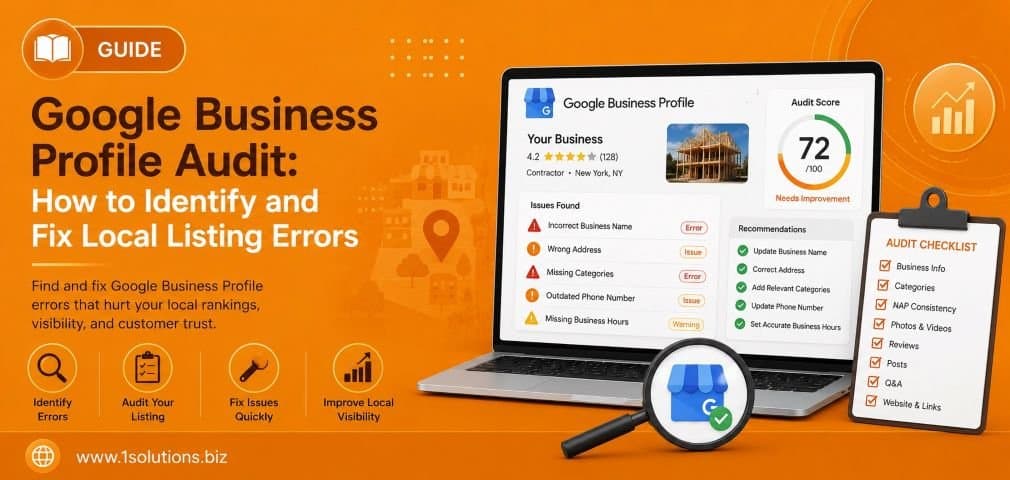
A Google Business Profile audit helps you find and fix errors that suppress your local search rankings. This guide covers 10 specific audit points including NAP consistency, category selection, review signals, photo quality, and more. Fix these issues and your visibility in the local pack will improve measurably.
⚡ Key Takeaways
- NAP inconsistency across directories is one of the top causes of local ranking drops.
- Choosing the wrong primary category can cost you significant local search visibility.
- Profiles with photos receive 42% more direction requests than those without (Google, 2022).
- Unresponded reviews, both positive and negative, signal low engagement to Google.
- Q&A spam and unanswered questions actively damage your profile’s credibility.
- Google Posts expire and can leave your profile looking inactive or stale.
- Regular audits every 90 days help you catch edits made by third parties or Google itself.
1. Verify Your NAP Data Is Completely Consistent
NAP stands for Name, Address, and Phone Number. It sounds basic, but inconsistent NAP data is one of the leading causes of poor local rankings. Google cross-references your Business Profile against dozens of other data sources including Yelp, Apple Maps, Bing Places, and local directories. If your business name is listed as “Smith Plumbing” in one place and “Smith Plumbing LLC” in another, or if your phone number has changed but wasn’t updated everywhere, Google treats these as conflicting signals and reduces its confidence in your listing.
During your audit, start by searching your business name and phone number in Google directly. Check if the Knowledge Panel matches what you have in your Google Business Profile dashboard. Then use a tool like Moz Local or BrightLocal to scan citation sources for discrepancies. Pay close attention to suite numbers, abbreviations like “St” versus “Street,” and old phone numbers that may still be floating around on older directories.
BrightLocal (2023) found that businesses with consistent NAP data across 10 or more citation sources ranked significantly higher in local pack results than those with inconsistent data. Fixing NAP is not glamorous work, but it is foundational. If you want professional help maintaining citation consistency alongside a broader strategy, explore structured local SEO packages that include citation management as a core deliverable.
2. Confirm Your Business Category Selection Is Accurate
Your primary category is arguably the single most important field in your entire Google Business Profile. It tells Google what type of business you are and determines which search queries you are eligible to appear for. Choosing “General Contractor” when you are primarily a kitchen remodeler, for example, means you will miss dozens of high-intent searches that a more specific category would capture.
Google offers over 4,000 business categories, and many businesses are either using an outdated one or one that is simply too broad. During your audit, log in to your profile and check both your primary category and any secondary categories you have added. Your primary category should reflect your single most important service or business type. Secondary categories should cover legitimate additional services you actually offer, not just services you want to rank for.
Competitor category research is also useful here. Search for your top two or three local competitors and check which categories appear in their Knowledge Panels. This can surface more specific categories you had not considered. Changing your primary category is a significant update and may trigger a re-verification in some cases, so do it carefully. Also note that adding irrelevant secondary categories can dilute your relevance signal, which is a trade-off worth understanding before you start stacking categories indiscriminately.
💡 Pro Tip: Search your target keyword in Google Maps and look at the category labels shown under your top competitors’ names. If they are using a more specific category than you, switch yours and monitor ranking changes over the next 30 days.
3. Audit Your Business Description for Keyword Relevance
Google gives you 750 characters to describe your business, but only the first 250 characters appear before the “More” link. This means your most important information, including your primary service and location context, needs to land in those first lines. Many businesses either leave this field blank or fill it with generic marketing copy that does nothing for their local visibility.
Your description should naturally include your primary keyword, mention the core services you offer, and communicate what makes your business different. It should read like something a helpful human wrote, not a keyword list. Avoid promotional language like “best prices” or “number one,” as Google’s guidelines explicitly discourage this. Instead, focus on facts: how long you have been in business, what services you specialize in, and any certifications or specializations that are relevant.
Cross-referencing your description with your website’s content is a smart move. If your site emphasizes emergency HVAC repair but your GBP description only mentions “heating and cooling services,” you are missing an alignment opportunity. For businesses that want help crafting descriptions that are both compliant and persuasive, working with a professional content and copywriting team can save a lot of trial and error.
4. Check That Your Website URL and Attributes Are Current
This audit point is one that businesses overlook most often because it seems obvious. But website URLs change. Pages get redesigned, domains get migrated, and tracking parameters get added. If the URL in your Google Business Profile is pointing to a redirected page, a 404 error, or an outdated domain, Google may reduce the trust score of your listing and customers who click through will have a poor experience.
Log in to your profile and click the website link yourself. Confirm it loads correctly, goes to the right page, and is not looping through multiple redirects. Ideally, your URL should point to your homepage or a location-specific landing page, not a generic blog post or a campaign page with an expiry date.
Beyond the URL, check your business attributes. Attributes are the small details like “wheelchair accessible,” “free Wi-Fi,” “outdoor seating,” or “woman-owned business.” These appear on your profile and influence whether you appear in filtered searches. Google regularly adds new attribute options, so run through the full list in your dashboard to see if any relevant ones are missing. Some attributes are objective (you either have a wheelchair ramp or you do not), while others are subjective and may be populated by Google or user suggestions, which is another reason to audit them regularly.
5. Review Your Photos and Visual Content Thoroughly
Visual content on your Google Business Profile is more impactful than most businesses realize. According to Google (2022), businesses with photos receive 42% more requests for directions and 35% more click-throughs to their websites than businesses without photos. Despite this, many profiles have either no photos, outdated photos, or user-submitted photos that do not represent the business well.
Your photo audit should cover several areas. First, check whether you have a professional cover photo and logo uploaded. These are the first visuals customers see. Next, look at all the photos in your profile, including those submitted by customers. If any user-submitted photos are inaccurate, low quality, or potentially damaging to your reputation, you can flag them for removal through the profile interface.
Also check photo freshness. A profile with photos from five years ago signals stagnation. Add new interior and exterior shots, photos of your team, product images, or recent project work. Videos are also supported and can increase engagement significantly. One trade-off worth noting is that adding low-quality photos is worse than adding none at all, so prioritize quality over quantity. Each image should be well-lit, in focus, and genuinely representative of your business. For businesses managing their profile alongside broader digital efforts, your photo strategy connects directly to your overall digital marketing approach.
💡 Pro Tip: Use Google’s suggested photo categories as a checklist. Common categories include exterior, interior, product, team, and at-work photos. Filling each category sends a completeness signal that can improve how your profile ranks in competitive local queries.
6. Examine Your Review Profile and Response Rate
Reviews are one of the strongest local ranking signals Google uses. According to Whitespark’s Local Search Ranking Factors report (2023), review signals account for approximately 17% of the factors Google weighs when determining local pack rankings. This includes review quantity, recency, diversity, and your response rate as a business owner.
During your audit, check the following. First, look at your overall star rating and how it has trended over the last 12 months. A drop in average rating is a signal that something has changed operationally. Second, look at how many reviews you have received in the last 90 days. Recency matters because Google wants to see that a business is actively serving customers. Third, check your response rate. Have you responded to every review, including the positive ones? Ignoring five-star reviews leaves engagement points on the table.
For negative reviews, your response should be professional, empathetic, and never defensive. A poor response to a bad review is often worse than no response at all. If you are dealing with a pattern of negative reviews or a reputation issue that is affecting your local visibility, it is worth exploring how a structured reputation management strategy can help you recover and build a stronger review profile over time. You can also read our related post on Google My Business mistakes that hurt local visibility for more context on common review-related errors.
7. Audit the Questions and Answers Section
The Q&A section of your Google Business Profile is populated by anyone, including people who have never visited your business. This creates a real risk that inaccurate or misleading answers are sitting on your profile right now without your knowledge. Many business owners do not even realize this section exists until an audit surfaces a problem.
Log in and scroll through every question and answer that appears on your profile. Check for outdated information such as old pricing, discontinued services, or incorrect hours. If you spot inaccurate answers posted by other users, you can flag them for removal. More importantly, you should be proactively seeding this section with the questions your customers actually ask most frequently.
Think about the top five questions your staff fields every week: Do you offer free estimates? Is parking available? Do you serve a specific area? Pre-answering these removes friction from the customer’s decision-making process and shows Google that your profile is actively managed. You can upvote your own answers by logging in through your Google account, which helps your answers appear at the top. This section is a low-effort, high-impact area that most businesses completely ignore during routine maintenance.
8. Check Your Google Posts for Freshness and Accuracy
Google Posts are short updates, offers, events, or announcements that appear directly on your Business Profile in search results. They are a free content channel that many businesses set up once and never revisit. The problem is that expired posts, outdated offers, or promotional content for events that have already passed create a poor first impression and signal that the profile is not actively managed.
During your audit, check whether you have any active posts and when they were last published. Offer and event posts expire automatically, but Standard posts remain visible for up to six months before becoming less prominent. If your most recent post is from eight months ago, that is a red flag worth addressing immediately.
Going forward, a sustainable Google Posts cadence is one to two posts per month. Posts work best when they are tied to something genuinely useful: a limited-time promotion, a new service launch, a seasonal reminder, or a link to a recent blog post. For example, linking to content like our guide on local AEO best practices for small businesses from a Google Post can drive additional traffic while keeping your profile fresh. Keep posts under 300 words, include a clear call to action, and always add a photo for higher engagement rates.
💡 Warning: Do not use Google Posts to keyword-stuff your profile. Google’s content policies apply here, and posts that read like spam or contain excessive promotional claims can result in post rejection or, in severe cases, profile suspension.
9. Audit Your Service and Product Listings
Google Business Profile allows you to list specific services and products directly on your profile. This feature is significantly underutilized. When populated correctly, it helps Google understand exactly what you offer, which can improve your appearance in highly specific service-related searches. For example, a plumber who lists “drain cleaning,” “water heater installation,” and “emergency pipe repair” as individual services will be more likely to appear for those specific searches than one who only has a vague business description.
During your audit, navigate to the Services section of your profile editor. Check whether your services are organized into logical categories, whether each service has a description, and whether the descriptions include natural language around what the service involves. If you sell physical products, the Products section allows you to add photos, prices, and descriptions that appear directly in search results, which can be particularly powerful for retail businesses.
One important trade-off: adding too many services or listing services you do not actually offer just to appear in more searches is a violation of Google’s guidelines and can result in profile suspension if flagged. Keep your listings honest and accurate. Also, if any services you previously offered have been discontinued, remove them. Stale service listings can generate negative reviews from customers who tried to book something you no longer provide. For businesses scaling their local presence alongside search optimization, our comprehensive SEO services include service page optimization that complements your GBP listings.
10. Confirm Your Profile Ownership and Security Settings
The final audit point is one that many businesses skip entirely until something goes wrong. Google Business Profile ownership and access management is a genuine security concern. Profiles can be edited by Google’s automated systems, flagged by competitors, or even claimed by unauthorized users if access is not properly controlled. According to a survey by Sterling Sky (2022), a significant percentage of local business owners had experienced unauthorized edits to their Google Business Profile without realizing it.
Start by checking who has Owner and Manager access to your profile. Go to the Business Profile Manager, navigate to the Users section, and review every account listed. Remove any former employees, old agencies, or unrecognized accounts immediately. Make sure the primary Owner account is tied to a secure, actively monitored email address.
Next, set up Google Business Profile notifications so that you receive an alert any time a change is made to your listing. This includes address changes, category changes, and photo additions, all areas where either automated Google edits or third-party suggestions can override your carefully maintained information. Check your profile for any suggested edits that are pending review and either approve or reject them promptly. Leaving suggested edits in a pending state too long can sometimes result in Google applying them automatically.
Finally, confirm that your profile is verified. An unverified profile has significantly reduced ranking power and is more vulnerable to being claimed by someone else. If your verification has lapsed or was never completed, that needs to be resolved before any other optimization efforts will reach their full potential. For a broader look at how technical issues like indexing and visibility errors affect your overall SEO health, see our post on why Google is not indexing your pages.
Google Business Profile Audit: Quick Reference Table
| Audit Area | What to Check | Priority Level | Time to Fix |
|---|---|---|---|
| NAP Consistency | Name, address, phone across all citations | Critical | 1-3 hours |
| Business Category | Primary and secondary category accuracy | Critical | 15 minutes |
| Business Description | Keyword inclusion, character limit, accuracy | High | 30 minutes |
| Website URL and Attributes | Live URL, relevant attributes selected | High | 20 minutes |
| Photos and Videos | Cover photo, logo, recent visual content | High | 1-2 hours |
| Reviews and Responses | Response rate, rating trend, recent reviews | High | Ongoing |
| Q&A Section | Accuracy of existing answers, seeded FAQs | Medium | 30 minutes |
| Google Posts | Freshness, expired content, post cadence | Medium | 20 minutes |
| Services and Products | Complete, accurate service listings | Medium | 45 minutes |
| Ownership and Security | User access, notifications, verification status | Critical | 20 minutes |
Practical Action Plan: What to Do After Your Audit
- Do This Now: Fix any NAP inconsistencies, verify profile ownership and access, confirm your primary category is accurate, and ensure your profile is verified. These are the foundation of every other optimization effort.
- Worth Doing: Update your business description with relevant keywords, audit and refresh your photos, respond to all unanswered reviews, and clean up the Q&A section. These actions have a direct and measurable impact on engagement and ranking.
- Low Priority: Build a Google Posts schedule, refine your service and product listings, and research competitor categories for potential improvements. These are important but can be done in a second round of work once the critical and high-priority items are resolved.
For businesses that want help executing these steps without taking time away from operations, working with specialists who understand both the technical and strategic sides of local search is worth considering. You can also deepen your knowledge by reading our post on how to boost your SEO efforts with page content analysis, which complements the on-profile work you do with stronger on-site foundations.
Conclusion: Your Google Business Profile Audit Is Never Truly Finished
Running a Google Business Profile audit is not a one-time task. Google makes changes to its platform regularly, competitors can suggest edits to your listing, and your own business details evolve over time. The 10 audit points covered in this guide give you a complete framework for identifying and fixing the errors most likely to suppress your local visibility.
Start with the critical items: NAP consistency, category accuracy, profile security, and verification. Then work through the high-priority items in a second session. Set a reminder to run through the full checklist every 90 days. Businesses that treat their GBP as a living asset rather than a static directory listing consistently outperform those that do not. The effort is modest, and the returns in local visibility, customer trust, and lead volume are real.
If you want expert support for your local search strategy, explore our local SEO packages designed to handle everything from citation building to profile optimization and beyond.
Frequently Asked Questions
How often should I run a Google Business Profile audit?
Every 90 days is a solid baseline for most businesses. However, if you have recently changed your address, phone number, business name, or primary services, run an audit immediately after making those changes to ensure all associated citations and profile fields are updated consistently.
Can competitors edit my Google Business Profile?
Anyone can suggest edits to your profile, including competitors. Google sometimes applies these suggestions automatically if they seem credible. Setting up profile notifications and auditing your listing regularly is the best defense against unauthorized or inaccurate changes appearing on your profile.
What happens if my Google Business Profile gets suspended?
A suspended profile will not appear in local search results or Google Maps at all. Suspensions can result from policy violations, duplicate listings, or suspicious activity. You will need to submit a reinstatement request through Google’s support channels. Maintaining a clean, accurate, and policy-compliant profile is the best way to avoid suspension in the first place.
Does adding more photos really improve local rankings?
Yes, indirectly. Google uses engagement signals like photo views, direction requests, and website clicks as indicators of profile quality. Profiles with more relevant, high-quality photos generate more engagement, which feeds those positive signals back to Google. The data from Google (2022) showing 42% more direction requests for profiles with photos supports this relationship clearly.
Is it worth hiring an agency to manage my Google Business Profile?
For single-location businesses with time to invest, self-management is entirely feasible using guides like this one. For multi-location businesses, service businesses with high review volumes, or companies that lack the internal capacity to audit and update their profiles consistently, professional management typically pays for itself through improved lead generation and reduced errors. The key is ensuring whoever manages your profile understands Google’s guidelines thoroughly to avoid compliance issues.