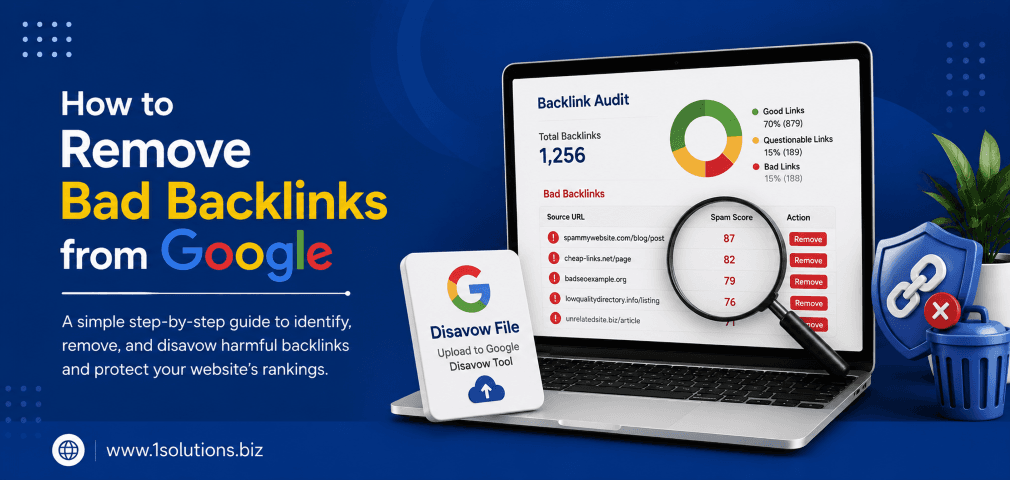
Knowing how to remove bad backlinks from Google is one of the most important skills for any website owner or SEO professional. Toxic links can drag your rankings down, trigger manual penalties, and undo months of legitimate SEO work. According to a 2023 study by Semrush, websites with a high proportion of spammy referring domains are significantly more likely to experience traffic drops after core algorithm updates. The good news is that you can identify, address, and neutralize harmful backlinks with a structured process. This guide walks you through exactly 10 steps to clean up your link profile and protect your site.
Bad backlinks from spammy, irrelevant, or penalized websites can seriously damage your Google rankings. This guide covers 10 actionable steps, from auditing your link profile and contacting webmasters to using Google’s Disavow Tool and monitoring your results over time. Taking these steps consistently helps you recover lost traffic and build a healthier, penalty-resistant backlink profile.
⚡ Key Takeaways
- Not all backlinks help you, some actively hurt your rankings and need to be removed or disavowed.
- Start with a full backlink audit using tools like Google Search Console, Ahrefs, or Semrush before taking any action.
- Always try to remove links manually by contacting webmasters before resorting to disavowal.
- Google’s Disavow Tool is powerful but should be used carefully. Disavowing good links can reduce your authority.
- Recovering from a penalty or toxic link profile takes time, often 3 to 6 months for results to appear.
- Pair your cleanup effort with a proactive strategy to build links safely without triggering penalties.
- Regular link monitoring prevents toxic links from accumulating unnoticed in the future.
Why Bad Backlinks Are a Serious SEO Problem
Before diving into the steps, it helps to understand what qualifies as a bad backlink and why Google cares. A bad backlink typically comes from a low-quality website, a link farm, a penalized domain, an irrelevant niche, or a site with artificially manipulated anchor text. Google’s Penguin algorithm, which became a permanent part of the core algorithm in 2016, specifically targets manipulative link schemes. According to Ahrefs (2024), over 66% of pages have zero backlinks at all, which means many sites competing in search are already starting with thin link profiles. Adding toxic links on top of that baseline only compounds the problem. If your site has received a manual action for unnatural links, you will see it flagged directly inside Google Search Console. Even without a manual action, algorithmic devaluation from Penguin can quietly suppress your rankings without any notification. Our Penguin recovery service has helped many businesses identify and resolve exactly these kinds of issues.
The 10 Steps to Remove Bad Backlinks from Google
1. Run a Full Backlink Audit Using Reliable Tools
The first step in understanding how to remove bad backlinks from Google is knowing exactly what links are pointing to your site. You cannot fix what you cannot see. Start by pulling your complete backlink profile from at least two sources to cross-reference data. Google Search Console is free and shows links Google has actually crawled. Ahrefs, Semrush, and Moz all offer paid audits with toxicity scoring. Export all referring domains and URLs into a spreadsheet so you can work through them systematically. Look for red flags like very low domain authority, foreign-language sites unrelated to your niche, pages with thin or duplicate content, sites with a high spam score, and links from private blog networks (PBNs). According to Moz (2023), a spam score above 30% should trigger a manual review of that linking domain. This audit phase is time-consuming but non-negotiable. Skipping it means you could end up disavowing good links or missing the worst offenders entirely. Take your time here because the quality of your entire cleanup depends on the accuracy of this initial assessment.
2. Categorize Links Into Tiers of Risk
Once you have your full link list, do not treat every suspicious link the same way. Organizing links into risk tiers makes the process manageable and helps you prioritize correctly. Create three categories: high risk, medium risk, and low risk. High-risk links come from known spam networks, adult sites with no relevance to your content, doorway pages, or sites flagged for malware. Medium-risk links come from low-quality directories, irrelevant guest posts with over-optimized anchor text, or sites that look legitimate but have unusually low metrics. Low-risk links might be from sites that are a bit thin but not actively harmful. For high-risk links, you will want to attempt removal and then disavow. For medium-risk links, use your judgment based on anchor text and context. For low-risk links, monitoring is usually sufficient. This tiered approach ensures you spend the most effort on the links most likely to be causing harm. It also prevents panic-disavowing links that are actually neutral or even marginally helpful to your profile. Document your reasoning for each decision in your spreadsheet so you have a clear record if you ever need to revisit your work or explain it to a client.
3. Check Google Search Console for Manual Actions
Before you take any external action, check whether Google has already issued a manual penalty against your site. Log into Google Search Console and navigate to Security and Manual Actions. If you see a manual action for unnatural links, this changes your priority level significantly. A manual action means a human reviewer at Google has already flagged your link profile as manipulative. In this case, removing or disavowing the offending links is not just good practice, it is required before you can file a reconsideration request. Manual actions can affect your entire site or specific sections. Understanding the scope helps you focus your cleanup appropriately. If you have not yet received a manual action but you suspect algorithmic suppression from Penguin, the same cleanup process applies, you just do not need to file a reconsideration request afterward. According to Google’s own documentation (2024), reconsideration requests for link-related manual actions are reviewed by the manual actions team and can take several weeks to process. For businesses that have already been hit hard, our Google penalty recovery services provide a structured path back to ranking stability.
💡 Pro Tip: Always screenshot your Manual Actions page before and after your cleanup. This creates a documented timeline that supports your reconsideration request and proves you acted in good faith.
4. Identify the Webmasters Behind the Bad Links
For each high-risk and medium-risk link you have identified, you need to find contact information for the site owner or webmaster. This step is tedious but important because Google expects you to attempt manual removal before using the Disavow Tool. Use the WHOIS lookup to find domain registration details. Look for a contact page, an about page, or a listed email address on the linking site. Some sites will have a privacy policy with contact information. If the site runs on WordPress, there is often a contact form. Record every contact attempt in your spreadsheet with the date, the method used, and the response received. Many linking sites are abandoned or run as spam operations, so you may receive no reply at all. That is acceptable and expected. The key is demonstrating due diligence. Typically, allow 2 to 3 weeks for a response before moving to the disavowal stage. Some webmasters will remove the link quickly once contacted, especially if they are running a legitimate site and simply linked to you by mistake. Others will ask for payment to remove the link, which you should always decline.
5. Send Formal Link Removal Requests
Once you have contact information, send a professional and polite link removal request. Keep it short and specific. Identify the URL where the link appears and the URL on your site it points to. Explain that you are conducting a link audit and request removal. Do not be confrontational or accusatory, even if the link is clearly from a spam site. A simple, factual tone gets better results. Here is a basic framework: introduce yourself as the owner of your domain, specify the linking page URL, specify the target URL on your site, and politely request the link be removed or the page be no-indexed. Send follow-up emails if you get no response within two weeks. Keep copies of all outreach emails as evidence of your efforts. If you have a large number of links to address, tools like BuzzStream or Pitchbox can help manage your outreach at scale. For particularly stubborn cases where the webmaster refuses removal or demands payment, document the refusal and proceed to disavowal. This documentation protects you if Google ever reviews your cleanup manually.
6. Build Your Disavow File Correctly
After attempting manual removal, it is time to compile your disavow file for the links that could not be removed. Google’s Disavow Tool accepts a plain text file where you list URLs or entire domains you want Google to ignore when evaluating your link profile. The format matters. To disavow a specific URL, list it on its own line. To disavow an entire domain, use the prefix “domain:” before the domain name, for example: domain:spamsite.com. You can add comments using a hash symbol at the start of a line, which is useful for noting why you disavowed each entry. Keep your disavow file focused only on genuinely harmful links. Over-disavowing is a real risk. If you disavow links from legitimate sites simply because their metrics look average, you could reduce your overall link authority unnecessarily. Cross-reference your disavow list with your tiered risk categories from Step 2 to make sure only high-risk and confirmed medium-risk links are included. Understanding how to fix a failed link building strategy also helps clarify which types of links should never have been built in the first place.
| Link Type | Risk Level | Recommended Action | Disavow? |
|---|---|---|---|
| Link farm / PBN | High | Request removal first, then disavow | Yes |
| Irrelevant foreign spam site | High | Disavow at domain level | Yes |
| Low-quality directory | Medium | Review anchor text; disavow if over-optimized | Sometimes |
| Thin but legitimate blog | Low | Monitor only | No |
| Competitor’s guest post with your link | Low to Medium | Evaluate relevance and anchor text | Rarely |
| Malware or hacked site | High | Disavow immediately at domain level | Yes |
7. Submit Your Disavow File to Google
Once your disavow file is ready, navigate to Google’s Disavow Links Tool, which is accessible through Google Search Console. Select your property from the dropdown menu and upload your text file. Google will confirm the upload and begin processing the information. It is important to understand that this is not an instant fix. Google needs to re-crawl the disavowed domains and factor your instructions into its assessment of your link profile. This can take several weeks to several months depending on how frequently those domains are crawled. After submission, save a copy of your disavow file locally with a date stamp. You will need to maintain and update this file over time as new toxic links appear. If you later discover you disavowed a legitimate link by mistake, you can update and re-upload the file with that entry removed. Be patient during this phase. Many site owners submit the disavow file and expect rankings to recover within days. Realistic expectations are important here. The process is gradual, and you should be measuring progress over a 90 to 180 day window rather than week by week.
💡 Pro Tip: Never delete your old disavow file and start fresh. Always update the existing file and re-upload it. Starting from scratch means Google loses the historical context of all your previous disavowal instructions.
8. File a Reconsideration Request if You Had a Manual Action
If Google issued a manual action against your site and you have now completed your link cleanup, you need to file a reconsideration request through Google Search Console. This is only applicable to sites with confirmed manual actions, not algorithmic penalties. In your reconsideration request, be transparent and specific. Explain what you found during your audit, what steps you took to remove links manually, which links you were unable to remove and why, and that you have submitted a disavow file. Attach or reference your outreach documentation. Google’s manual review team responds to honesty. Attempts to minimize the issue or shift blame tend to result in rejection. According to Google’s Search Central documentation (2024), reconsideration requests that include detailed evidence of cleanup efforts are more likely to result in the manual action being revoked. After submitting, you may wait several weeks for a response. If your request is denied, Google will usually provide guidance on what still needs to be addressed. Treat a denial as feedback, not a failure, and use it to refine your cleanup before re-submitting. Our team at 1Solutions has guided businesses through this exact process as part of our broader professional SEO services.
9. Replace Lost Link Equity With Quality Backlinks
Removing bad backlinks is only half the equation. If you have cleaned up a significant number of toxic links, your overall link count drops, and you need to rebuild your authority with high-quality replacements. This is where proactive link building becomes essential. Focus on earning links from authoritative sites in your niche through content marketing, digital PR, and genuine relationship building. Securing high-quality guest post placements is one of the most reliable ways to earn contextually relevant links. You should also look at your internal link structure, since using internal links strategically can help distribute the authority from your best backlinks more effectively across your site. Review our guide on link building methods that continue to work for a comprehensive list of safe, effective tactics. According to Backlinko (2023), the average first-page Google result has 3.8 times more backlinks than results ranking in positions 2 through 10. This demonstrates that link equity still matters significantly. Building clean links in parallel with your cleanup effort accelerates your recovery timeline and strengthens your overall domain authority.
💡 Warning: Do not rush your link building efforts during a penalty recovery phase. Aggressive or low-quality link building while you are recovering can trigger another review and make your situation worse. Prioritize quality over speed.
10. Monitor Your Backlink Profile on an Ongoing Basis
The final step is the one most people skip: sustained monitoring. Bad backlinks do not stop appearing just because you cleaned up once. Competitors can engage in negative SEO by pointing spam links at your domain. Automated link schemes can pick up your site over time. New low-quality directories may syndicate your content with junk links attached. Set up a recurring monthly audit using your preferred tool, whether that is Ahrefs, Semrush, or a combination. Configure alerts for sudden spikes in new referring domains, which can indicate a negative SEO attack. Review your disavow file quarterly and update it as needed. Track your organic traffic trends in Google Analytics and correlate any drops with your link data to spot emerging issues early. If you are also working on broader search visibility goals, our article on Google penalty recovery using smart link building tactics provides additional strategic context. Pairing your cleanup with sound overall SEO practices, including consistent content quality, technical health, and ethical link acquisition, creates a site profile that is resilient to algorithm updates and competitor interference. Consider our link building packages if you need ongoing professional support to maintain and grow a clean, authoritative link profile over time.
Practical Action Plan: Priority Tiers for Backlink Cleanup
- Do This Now: Run your backlink audit in Google Search Console and at least one paid tool. Check for manual actions. Categorize your links into risk tiers. Begin outreach to webmasters for your top 20 highest-risk links. This immediate action prevents further damage and starts the paper trail you need.
- Worth Doing: Build your disavow file, submit it to Google, and send a reconsideration request if applicable. Simultaneously begin planning your quality link building campaign to replace lost equity. Set up monthly monitoring alerts for new referring domains.
- Low Priority: Deep-dive analysis of low-risk links and borderline directories. These are worth reviewing over time but are unlikely to be causing significant harm in the short term. Address them during your quarterly audit cycles rather than upfront.
How Long Does Backlink Removal Actually Take?
One of the most common questions site owners ask is how quickly they can expect to see results after cleaning up bad backlinks. The honest answer is that it varies considerably. Algorithmic recovery from Penguin typically happens gradually as Google re-crawls and reprocesses your link profile, which can take anywhere from a few weeks to several months. Manual action revocation after a successful reconsideration request may come faster, sometimes within a few weeks, but this depends entirely on Google’s review queue and the thoroughness of your submission. Setting realistic expectations with clients or stakeholders is important. Recovery is rarely linear. You may see some ranking fluctuations before you see consistent improvement. According to Search Engine Journal (2023), many sites recovering from link-related penalties begin to see measurable improvements in organic traffic within 3 to 6 months of completing a thorough link audit and disavowal process. For sites that also pair cleanup with fresh, high-quality content and technical SEO improvements, recovery timelines tend to be faster. If you are concerned about your current indexing status alongside your link issues, our post on why Google might not be indexing your pages addresses other common visibility blockers that can compound a penalty situation.
Conclusion
Understanding how to remove bad backlinks from Google is not a one-time task. It is an ongoing part of responsible SEO management. The 10 steps covered here, from auditing your link profile and contacting webmasters to submitting disavow files and rebuilding your authority with quality links, give you a complete framework for protecting and restoring your rankings. The process requires patience, documentation, and a commitment to building the right kind of link profile going forward. If you find the process overwhelming or are dealing with a serious penalty situation, professional support can make a significant difference in both the speed and thoroughness of your recovery.
Frequently Asked Questions
Does Google automatically ignore bad backlinks without a disavow file?
Google does try to algorithmically ignore many types of low-quality links on its own, and in many cases, no action from your side is needed. However, for sites that have received manual actions or that have a clear pattern of manipulative link building, relying on Google to sort it out automatically is risky. The Disavow Tool exists precisely because automatic filtering is not always sufficient. Using it for genuinely toxic links gives you direct control over your link profile evaluation.
Can I disavow an entire domain instead of individual URLs?
Yes, and in most cases it is the recommended approach for spam domains. When an entire domain is clearly a link farm, PBN, or spam site, disavowing at the domain level using the “domain:” prefix covers all current and future links from that source. Disavowing individual URLs from a bad domain is less efficient because new spammy pages on that domain can still link to you. Domain-level disavowal is cleaner and more protective.
What happens if I accidentally disavow good backlinks?
If you disavow links from legitimate, authoritative sites, you may inadvertently reduce your own link authority in Google’s eyes. To fix this, update your disavow file to remove those entries and re-upload it. Google will then begin factoring those links back into your profile during its next crawl cycles. This is why a careful, tiered approach to identifying which links to disavow matters so much. Rushing the process increases the risk of disavowing links that were actually helping you.
How do I know if I am a victim of negative SEO through bad backlinks?
Signs of a negative SEO attack include a sudden spike in new referring domains from obviously spammy sources, a sharp drop in organic traffic with no clear on-site cause, and anchor text patterns that are completely unrelated to your content. Monitoring your backlink profile monthly makes it much easier to spot these patterns early. If you suspect an attack, document everything and begin your disavowal process promptly. You can also flag the situation to Google through Search Console’s spam report tool.
Should I remove my disavow file after my rankings recover?
No. Once submitted, your disavow file should remain active and be updated regularly rather than deleted. Removing it would allow Google to start counting all the previously disavowed links again, which could reverse your recovery. Think of your disavow file as a living document that grows over time as you identify new toxic links. Review and update it quarterly to keep it current and effective as your link profile evolves.